
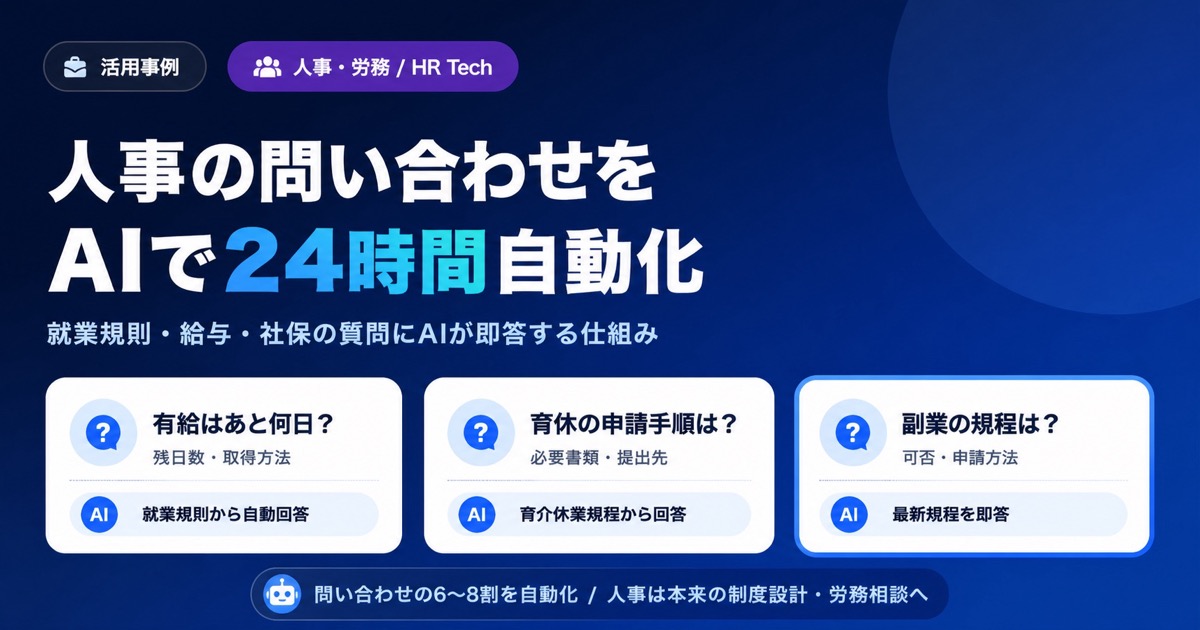
"How many vacation days do I have left?" "When is the deadline to apply for parental leave?" "What does our policy actually say about side jobs?" HR mailboxes and Slack channels fill up with the same questions every single day. Answering each one carefully eats into the time HR really needs for policy design and recruiting. It's a shared frustration in HR teams at small and mid-sized companies everywhere.
This article lays out a practical approach for automating routine HR and labor inquiries with AI -- covering the employee handbook, payroll rules, and social insurance procedures (shakai hoken). We'll walk through a confidentiality-tiered design that keeps operations safe, LINE delivery so frontline staff can actually use it, and a documentation workflow that keeps the system current through legal updates. Everything here is grounded in real-world operations you can put into motion tomorrow.
If you'd like to try it for free first, take a look at our pricing plans.
What You'll Learn
- The TOP 10 "we keep getting this question" inquiries HR receives, and which ones AI can automate
- A folder design framework that splits documents by confidentiality into "ingest into AI" vs. "don't ingest"
- How to use the right delivery channel (LINE, web widget, admin console) for the right audience
- A documentation workflow that keeps your AI current as laws change
- Cost and security considerations for organizations of 50 to 300 employees
The TOP 10 Recurring Questions HR Always Gets
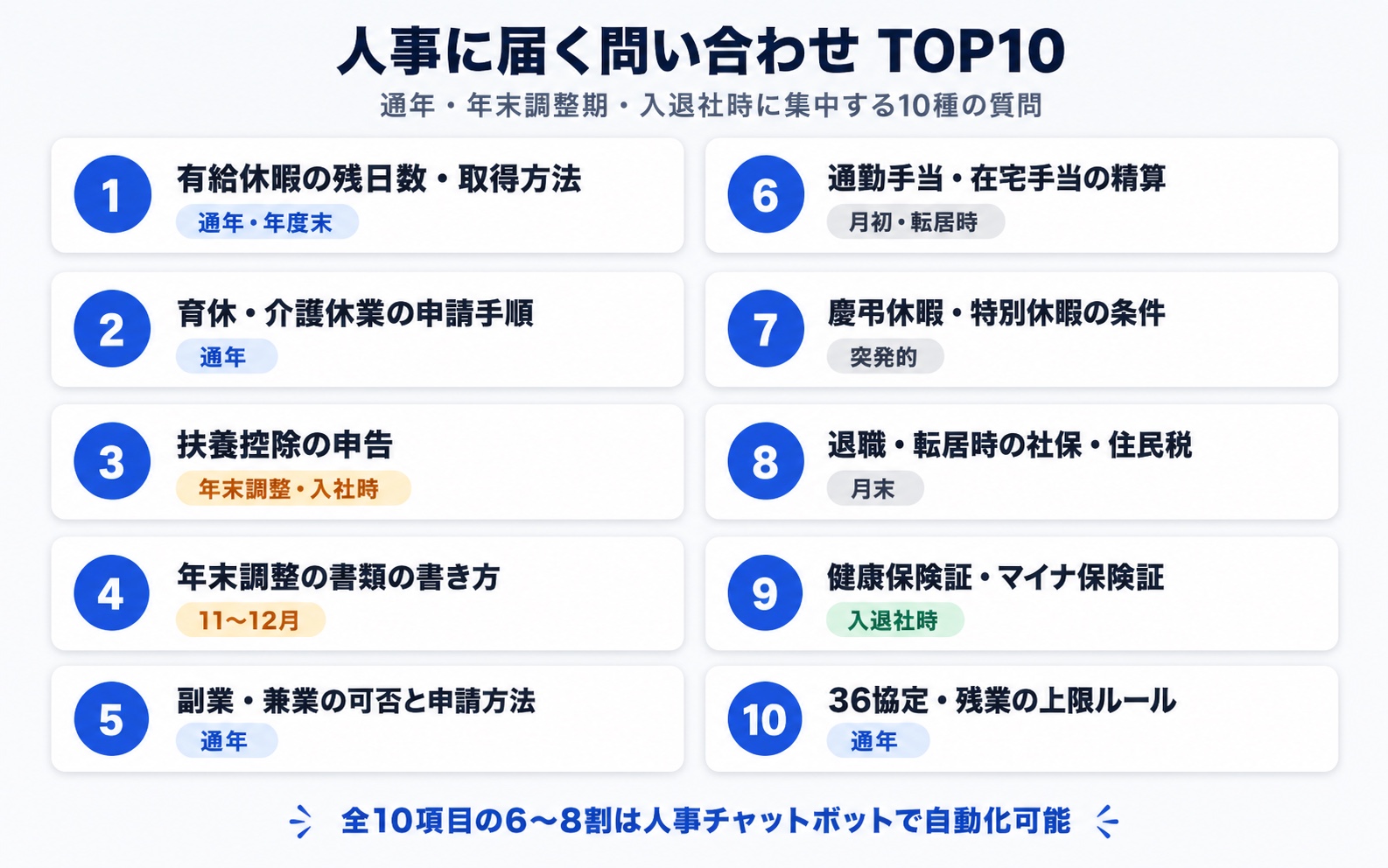
HR inquiries follow remarkably consistent patterns. Across most companies, the daily flow centers on the same ten topics.
| Rank | Question | When It Spikes |
|---|---|---|
| 1 | Remaining paid time off (PTO) and how to request it | Year-round, especially fiscal year-end |
| 2 | How to apply for parental or family-care leave | Year-round |
| 3 | Adding a dependent for tax withholding | Year-end tax adjustment season, on hire |
| 4 | How to fill out year-end tax adjustment (nenmatsu chosei) forms | November-December |
| 5 | Whether side jobs are allowed and how to apply | Year-round |
| 6 | Commuting allowance and remote-work allowance rules | Start of month, on relocation |
| 7 | Eligibility for bereavement and special leave | Sporadic |
| 8 | Social insurance and resident tax handling on resignation or relocation | End of month |
| 9 | Health insurance card and My Number health card procedures | On hire and resignation |
| 10 | Article 36 agreement (sanroku kyotei) and overtime caps | Year-round |
The answers to all of these are already written in the employee handbook and supplementary policies. Inquiries don't go down because employees feel that "asking a person is faster than reading the rulebook."
Why Employee Handbooks Are So Hard to Search
The instinct to reply with "it's all in the handbook -- please read it" is understandable. But there are structural reasons employees keep coming back to HR directly.
Three Reasons Handbooks, Pay Rules, and Social Insurance Procedures Get Scattered
1. The documents are split across many files
The main employee handbook, the wage policy, the parental and family-care leave policy, the retirement allowance policy, the harassment prevention policy, the bereavement and congratulatory gift policy... Mid-sized companies routinely have HR-related policies spread across more than ten separate PDFs. To answer a single question like "what happens to social insurance premiums during parental leave?", you have to cross-reference several of them.
2. Document storage is fragmented
Internal portals, shared drives, Notion, kintone, paper binders. Where policies live varies by department and by era, and employees who joined in different years may not even share the same map of "where to look."
3. Every legal update creates a new version
Japan's Childcare and Family Care Leave Act, the Labor Standards Act, and social insurance laws are revised every few years. There's always a transitional period where the old and new versions coexist, and figuring out which one is currently in force takes real time.
The "Paraphrasing Wall" Full-Text Search Can't Cross
Employees ask in their own words, not in the handbook's formal terminology.
- Handbook: "annual paid leave," "leave to care for a sick child," "extended absence due to personal injury or illness"
- Employee asking: "PTO," "time off when my kid has a fever," "what happens to my pay if I'm out for a long time after an injury?"
Full-text search (Ctrl+F) on a PDF won't connect "kid has a fever" to the "leave to care for a sick child" policy. You need search that understands paraphrasing -- and this is the single biggest barrier to reducing HR's load.
For more on how keyword search differs from asking an AI, see From "Search" to "Ask" -- The New Default for Internal Information in the AI Era.
What an HR Chatbot Can and Can't Automate
AI won't automate every HR task. The key to a successful rollout is deciding upfront what to delegate to AI and what stays with humans.
What AI Can Handle as Routine Responses
| Area | Examples |
|---|---|
| Policy lookups | PTO entitlement, bereavement leave, side-job rules, flex-time core hours |
| Procedure walk-throughs | Forms and recipients for parental leave, paperwork for adding a dependent, the resignation flow |
| Deadlines and cutoffs | Year-end tax adjustment deadlines, resident tax filing dates, social insurance switchover timing |
| Calculation premises | Commuting allowance caps, scope of remote-work allowance, bereavement gift amounts |
| Explaining legal updates | Summary of changes to the parental leave law, overview of expanded social insurance coverage |
What Humans Should Still Handle
| Area | Why |
|---|---|
| Individual labor consultations (mental health, harassment) | High confidentiality, requires situational understanding and empathy |
| Performance review disputes | Requires individual judgment and accountability |
| Labor disputes and exit negotiations | Legal risk; needs in-person handling |
| Personal payslips and individual social insurance records | Personal data; must go through HR after identity verification |
The lion's share of inquiries is policy lookups and procedure guidance. Delegating that part to AI frees HR to focus on the work only people can do: policy design, recruiting, and labor consultations.
A Folder Design Framework for Safely Operating HR Knowledge
This is the heart of the article. When you put HR information into AI's hands, the most critical step is clearly drawing the line between what does and does not get ingested. Documents you ingest become accessible to members within the tenant, so the first principle of safe operation is to never mix in highly confidential material.
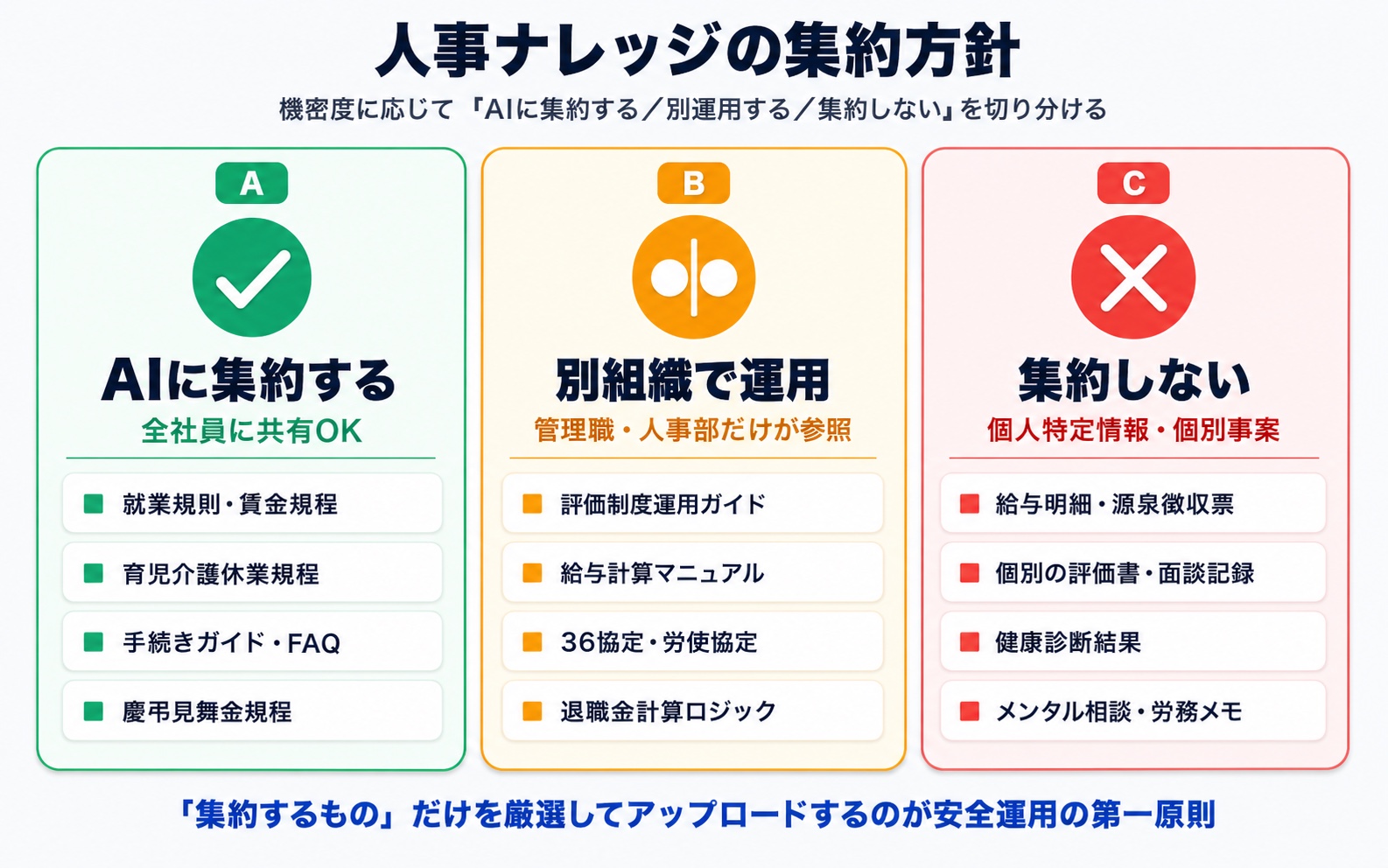
Sort HR Documents into Three Tiers
Group your HR-related documents by confidentiality into these three tiers:
- A. Ingest into AI (safe to share with all employees): Employee handbook, supplementary policies, common procedure guides
- B. Operate in a separate tenant or organization (managers / HR only): Performance system operation guides, demotion / PIP procedures, salary bands, payroll calculation logic, labor agreement negotiation notes
- C. Don't ingest into AI (personally identifiable, individual cases): Payslips, withholding tax slips, health checkup results, individual performance reviews and 1:1 notes, mental health consultation records
The safe pattern is to ingest only Tier A -- the generalized information that applies to everyone -- into Monoshiri AI. Tier B and Tier C should not be loaded into the AI tenant; they belong in a separate organization account or in another internal system entirely.
Sample Folder Structure for AI Ingestion
Here's an example folder layout containing only Tier A documents.
HR Knowledge (Company-Wide)/
├── Policies/
│   ├── Employee Handbook (Current)
│   ├── Wage Policy
│   ├── Parental & Family-Care Leave Policy
│   ├── Remote Work Policy
│   └── Bereavement & Gift Policy
├── Procedure Guides/
│   ├── Onboarding & Offboarding Flow
│   ├── Address Change Filing
│   ├── Adding a Dependent
│   └── Issuing a Health Insurance Card
└── FAQ/
    └── Frequently Asked Questions
The key is that everything inside this folder must be safe to disclose to all employees. Classify your information first, upload it second -- that workflow is what guarantees safety.
Practical Tips for Keeping Personal Data Out
Always check files for personal data before uploading. The realistic guidelines:
- Never upload personally identifiable documents like payslips, withholding tax slips, or health checkup results
- Keep individual performance reviews and 1:1 notes in your performance management system (don't ingest them into AI)
- Ingest only generalized information that applies to everyone -- policies, procedure guides, and FAQs
If you want to automate something like "my remaining PTO balance," the safe pattern is to combine your time-tracking system (which notifies the individual directly) with AI that only answers about the rules for accruing PTO.
Choosing the Right Delivery Channel (LINE / Web / Admin Console)
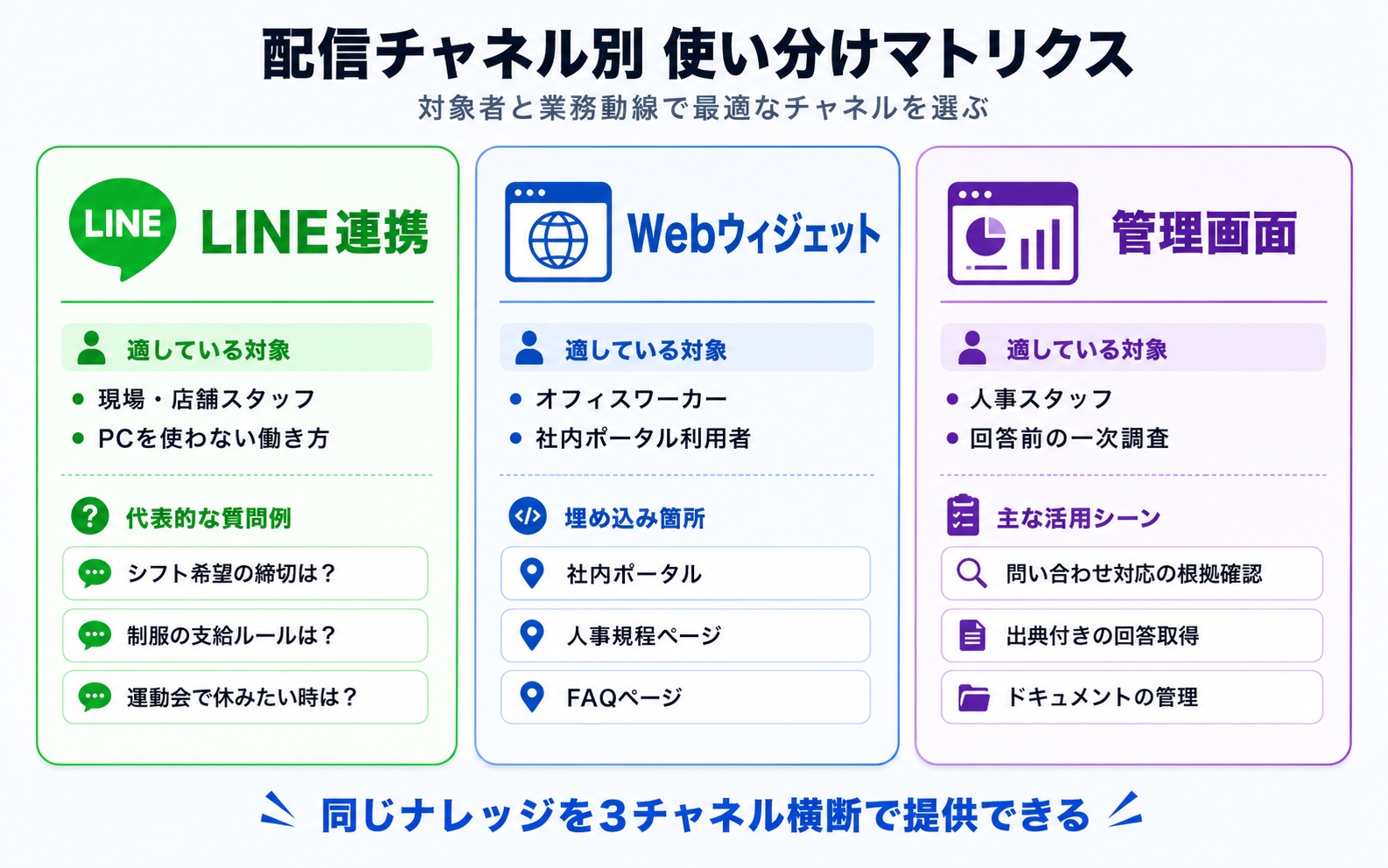
Adoption depends heavily on where you make the HR AI accessible. Because Monoshiri AI lets the same knowledge base be served across multiple channels, you can match the channel to the audience.
LINE: Reaching Frontline and Store Staff
For frontline workers who don't sit in front of a PC all day -- in restaurants, retail, manufacturing, caregiving, construction -- logging into an internal portal is a real psychological barrier. With LINE integration, an admin enables it from the admin console, and each employee adds the official account as a friend on the LINE app they already use every day to link their account. From there, they can ask the AI about the employee handbook right from their phone. No new app to install.
- "When is the deadline to submit shift preferences?"
- "What's the rule on uniform issuance?"
- "I want to take time off for my kid's sports day -- should I use PTO or special leave?"
The less time someone spends at a PC, the more likely they are to call or DM HR directly. Putting an AI in their LINE chat is the fastest way to chip away at policy-lookup inquiries, starting with the most frequent ones.
For industry-specific patterns, see Asking Internal Manuals on LINE.
Embed a Web Chat Widget in the Internal Portal
Drop a web chat widget into your intranet or employee portal so people can ask naturally as they browse. It captures the moment of "I opened the policy page but can't find what I'm looking for" and turns it into an answer on the spot.
HR Staff Use the Admin Console for First-Pass Research
HR staff themselves benefit from using Monoshiri AI as a first pass before responding to questions in email or Slack. Every answer cites the source documents, so they can verify the basis and respond in their own words.
Documentation Workflow for Legal Updates and Policy Revisions
The hardest part of running HR knowledge is keeping the system in a state where only the current version is ever used to answer. If old policies stick around, the AI will return outdated information.
A realistic workflow with Monoshiri AI looks like this:
- Catch the legal update (subscribe to releases from the Ministry of Health, Labour and Welfare; the Pension Service; and the tax authorities)
- Revise internal policies (finalize the new version after consulting your social insurance labor consultant and labor-management discussion)
- Remove the old policy from the folder (or move it to an "archive" folder)
- Upload the new policy (include "Current_yyyymmdd" in the filename)
- Announce the update company-wide (broadcast via internal portal, email, and LINE)
The discipline is to enforce "only current versions live in the current-version folder." If you want to preserve revision history, keep it in a separate folder (Archive & Revision History/) that's excluded from the AI's answer scope.
Security: Four Things to Verify Before Handling HR Data
The first question IT and leadership ask about HR AI is always "is this data actually safe?" Here are the four checks you absolutely need.
| Check | What Monoshiri AI Provides |
|---|---|
| Data residency | Stored in AWS data centers in Japan (Tokyo) |
| Tenant isolation | Fully isolated per organization; never mixed with other companies' data |
| AI model training | Uploaded data is never used to train AI models |
| Encryption in transit and at rest | TLS in transit plus encryption at rest |
HR policies are exactly the kind of information that, if leaked, could be used as leverage in wage negotiations or labor disputes. The right framing isn't "cloud = risky" -- it's "which cloud, and how is it designed?" A purpose-built SaaS with proper tenant isolation is meaningfully safer than uploading the same files into a general-purpose public AI service.
For more on the risks of using public AI services like ChatGPT for HR data, see our Security Policy.
Cost Modeling for 50, 100, and 300-Person Organizations
HR AI has to be built on the assumption that every employee uses it daily. Tools that charge per user are a real obstacle here -- the cost of company-wide rollout balloons fast.
Per-User Knowledge Tools vs. Monoshiri AI
The numbers below compare a typical per-user knowledge tool at JPY 1,500 per user per month against Monoshiri AI's Standard plan at JPY 7,980 per month with unlimited users.
| Size | Per-User Tool (monthly) | Monoshiri AI Standard (monthly) | Difference (monthly) |
|---|---|---|---|
| 50 people | ¥75,000 | ¥7,980 | -¥67,020 |
| 100 people | ¥150,000 | ¥7,980 | -¥142,020 |
| 300 people | ¥450,000 | ¥7,980 | -¥442,020 |
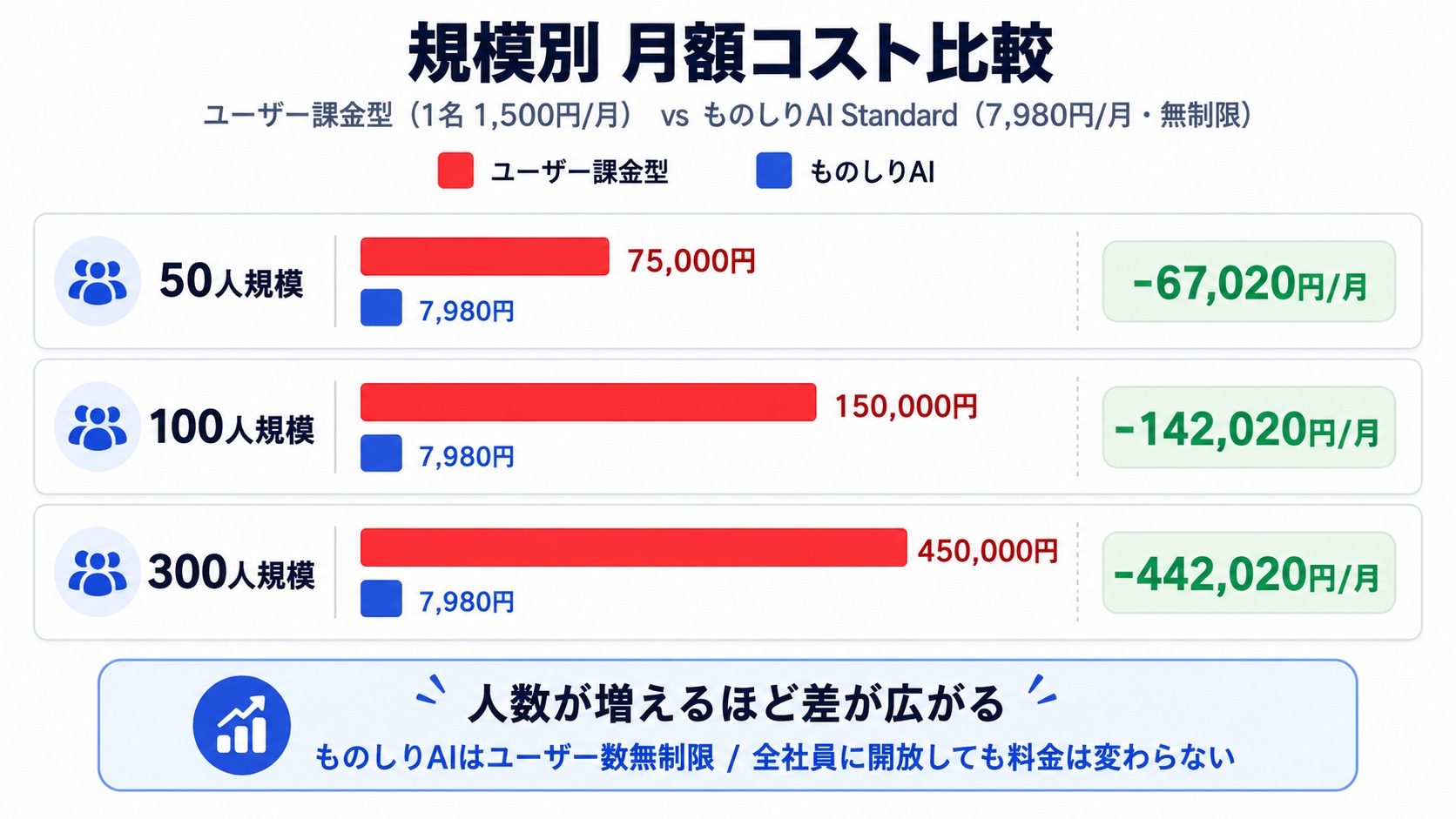
The whole point of HR knowledge is that every employee can ask whenever they need to. A pricing model that scales with headcount inevitably forces companies to limit access to "just managers" or "just HR" -- and at that point, you've lost the value proposition.
We dig deeper into the economics of unlimited-user pricing in Rolling Out a SaaS Company-Wide with Unlimited Users.
For the full pricing breakdown, see the pricing page. The Light plan starts at ¥2,980 per month -- also with unlimited users.
Implementation: Launching HR AI in 30 Days
Here's a realistic roadmap for standing up HR AI from zero. Don't aim for perfection -- the pattern that works is starting small and growing the system through actual operation.
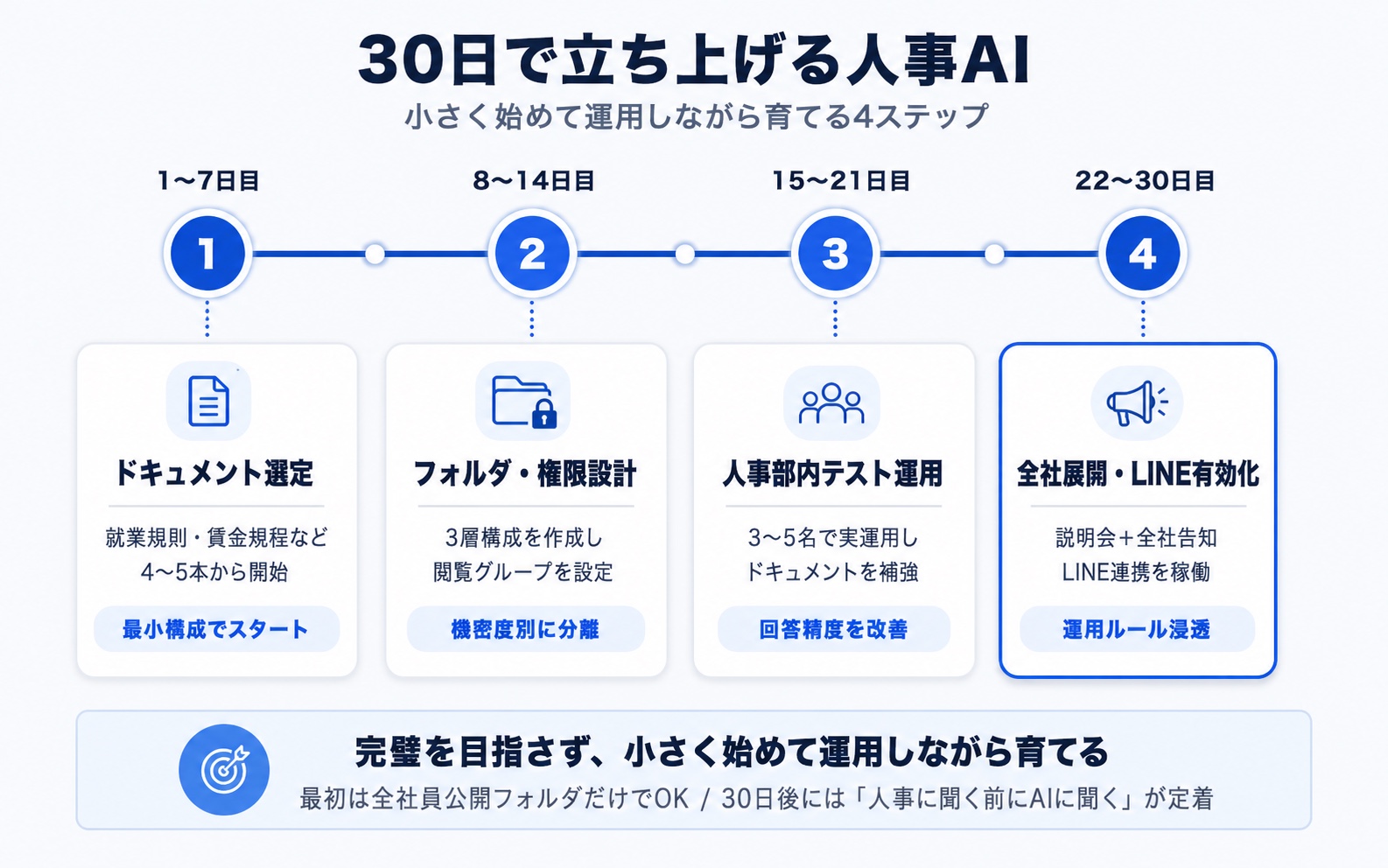
Step 1 (Days 1-7): Pick the documents to load
Start with just the company-wide-public folder. Begin with four to five documents: the employee handbook, the wage policy, the parental and family-care leave policy, and a couple of common procedure guides.
Step 2 (Days 8-14): Design the ingestion policy and folder structure
Sort documents into "ingest" (policies, procedure guides, FAQs) and "don't ingest" (individual reviews, payroll calculations) and lay out the folder structure. Policies and procedure guides alone are plenty to start.
Step 3 (Days 15-21): Pilot inside HR
Have three to five HR team members use it for a week to surface "this answer is wrong" and "this phrasing is unclear" issues. The root cause is almost always gaps in the source documents, so amend the policy or FAQ and re-upload.
Step 4 (Days 22-30): Roll out company-wide and enable LINE
Brief managers, then announce to all employees. Enable LINE integration and establish the cultural rule: "Ask the AI before asking HR."
For tips on driving adoption after launch, see The 5 Things to Do in the First 30 Days After Adopting a Knowledge Base AI.
Frequently Asked Questions About HR AI
Q. Can the AI answer individual questions like my exact remaining PTO balance?
A. Monoshiri AI alone is designed to answer generalized information like "the rules for how PTO is granted." Per-person balance data lives in your time-tracking system, and we don't recommend pulling it into the HR AI directly. The safest division of labor is to let your time-tracking system notify each individual and let the AI explain the policy.
Q. How is this different from uploading the employee handbook to ChatGPT or Gemini?
A. Public AI services may, on free or individual plans, contractually use your input to improve their models (Team and Enterprise contracts typically opt out of training by default). Monoshiri AI, by contrast, is consistent across every plan: each organization is fully isolated as its own tenant, and your data is never used to train AI models. For data as sensitive as HR information, choosing a service designed for enterprise use is the safer path.
Q. I'm worried about the overhead of re-uploading policies every time the law changes.
A. Policy revisions only happen once or a few times a year. You replace just the file that changed, and from that point on the AI answers using the new content. We recommend including the date in the filename so you have a clear record of when each revision took effect.
Q. We're hesitant about using personal LINE accounts for work.
A. LINE integration can be opt-in -- only employees who want to add the official account as a friend do so. There's no need to mandate it for everyone. The realistic split is LINE for frontline and store staff who don't use a PC, and the web chat widget or admin console for office workers.
Q. Can we ingest advice from our outside social insurance labor consultant?
A. General guidance from your consultant -- like "operational examples for the mandatory five-day annual PTO requirement" -- is fine to ingest as an internal operations guide. However, advisory notes about specific employees' labor issues contain personal information and should not be ingested into AI.
Q. Can we ingest performance review meeting notes?
A. Review meeting content is individual to each employee, so we don't recommend ingesting it. That said, the operational rules of the performance system itself can be ingested into a separate manager-only organization account, where it serves managers as a knowledge base.
Summary
The bulk of inquiries that hit HR are routine questions whose answers already exist in the employee handbook and supplementary policies. "Just read the rulebook" doesn't solve this structural problem -- but an AI knowledge base can.
- Most policy-lookup and procedure-guidance inquiries can be automated by an HR chatbot, freeing humans for policy design and labor consultations
- A confidentiality-tiered design separating "ingest into AI" from "don't ingest" prevents sensitive data from leaking into the system
- Combining the three channels -- LINE, web widget, admin console -- covers every audience from frontline staff to office workers
- Japanese AWS data residency, full tenant isolation, and encryption deliver the safety profile HR data demands
- With unlimited-user pricing, the bill is the same at 50 employees or 300 -- ideal for an HR AI that only delivers value when everyone can use it
You don't need more than the employee handbook and the wage policy to begin, with an internal HR pilot to validate. Thirty days in, "ask the AI before asking HR" becomes the default.
Take a look at our pricing plans, feature details, and security measures, then take your first step with a small folder. That's all it takes to get HR AI off the ground.
