

"I want to double-check a procedure while serving a customer, but there's no time to run to the back office to find a PC." "I need to verify safety standards on the construction site, but all we have is a thick paper manual." "I'm on a sales call and I'd like to look up internal materials right in front of the client, but I can't pull them up fast enough."
For frontline staff who don't have constant access to a PC, simply getting to internal information is a major barrier in itself. This article explains how to use LINE -- the messaging app virtually everyone in Japan already uses daily -- to let employees ask questions about company manuals and business knowledge, along with concrete use cases by industry.
Note for international readers: LINE is Japan's most popular messaging app, used by roughly 80% of the country's smartphone users. It functions as essential communication infrastructure in daily life, much like WhatsApp in many other regions.
What you'll learn in this article
- The information access challenges faced by frontline staff without PCs
- How LINE can be used to query internal knowledge (only invited members can access it)
- Use cases across restaurants, construction, retail, field sales, and customer support
- How access control and security work
- How this differs from LINE Official Account's AI Chatbot (beta) and other services
About 60% of Japan's workforce doesn't use a PC on a daily basis
According to labor statistics from Japan's Ministry of Internal Affairs and Communications and various employment surveys, only about 40% of Japan's workforce works primarily at a desk. The remaining 60% are on the frontlines -- in manufacturing, construction, healthcare, hospitality, logistics, and agriculture.
In these workplaces, the smartphone, not the PC, is the primary information device. And yet most company manuals, procedures, and policy documents still live in shared folders or internal portals that can only be reached from a PC.
As a result, frontline staff end up in situations like these:
- "When I don't know something, I just call a senior colleague."
- "I carry a paper manual, but it's never up to date."
- "I lose time every day walking back to the office just to open a PC."
- "The burden falls on the store or site manager, which creates retention risk."
Why LINE -- Japan's "daily life infrastructure" with 100 million users
LINE surpassed 100 million monthly active users in Japan in January 2026, cementing its status as a core piece of daily life infrastructure in Japan.
Using LINE as the entry point to your internal knowledge base offers four key advantages.
1. No new app installation or login required
- You're using an app frontline staff already use every day
- Works for anyone regardless of age or tech literacy
2. Everything fits on a smartphone
- No need to stop work to open a PC
- Staff can ask questions on the spot, whether they're at a client site, on the field, or in-store
3. Excellent push notifications
- Answers arrive immediately
- No need to juggle email or separate chat tools
4. Safe operation through organization-approved account linking
- Administrators enable LINE integration, and each user links their personal LINE to their company account
- If a LINE account is ever leaked or compromised, the organization can instantly revoke access by unlinking the account
- Offboarding and transfers are handled simply by updating company account permissions
How it works -- Only invited members can access internal knowledge via LINE
Monoshiri AI's LINE integration is a closed environment where only members your organization has invited can access it. This is not a public bot that answers anyone -- only users with company accounts can query internal documents.
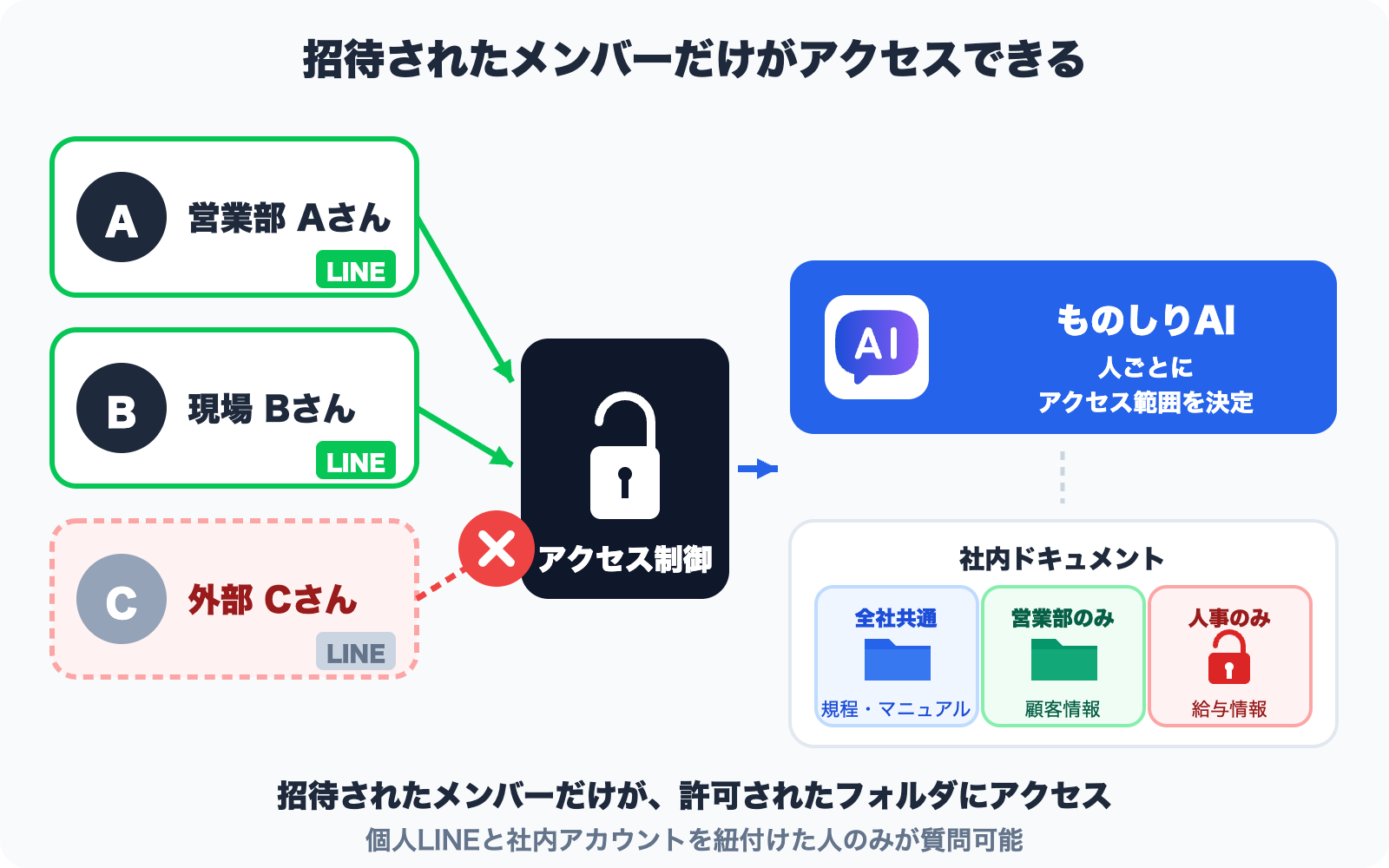
Access control flow
- Administrators upload company documents
- Ingest manuals, procedures, policies, and FAQs as-is
- Set visibility by folder (by department or project)
- Administrators invite members
- Issue company accounts via email
- Assign accessible folders on a per-user basis
- Each user links their personal LINE to their company account
- Users connect their own LINE to their own company account
- LINE accounts that aren't linked cannot access internal knowledge
- Ask questions on LINE -- AI answers only from documents within the user's permissions
- Only folders the user has access to are searched
- Restricted information (HR data, executive materials, etc.) is never shown
- Source documents are cited so accuracy can be verified
In other words
- Just adding the LINE Official Account as a friend does not give you access to internal information
- Only users who have been invited and have linked their company account can ask questions
- Even if a personal LINE account is compromised, unlinking it from the company account immediately cuts off access
- Cross-department information leakage is prevented through folder-level permissions
Use cases by industry
1. Restaurants -- Instantly check menus, allergens, and hygiene standards
Waitstaff and managers often need on-the-spot information during service, such as:
- Allergen information for specific menu items
- Ingredient origins and nutritional details
- Hygiene procedures (HACCP-compliant steps)
- Complaint handling workflows
When a customer asks, "Manager, does this dish contain wheat?", a quick LINE query like "carbonara allergens" returns the answer straight from internal documents.
2. Construction sites -- Safety standards, procedures, and equipment handling
On construction sites, quick access to safety standards and procedures directly prevents accidents.
- Scaffolding assembly procedures
- Heavy equipment operating manuals
- Health and safety standards
- Emergency contact flows
Instead of carrying a thick site manual, a worker can ask LINE "scaffolding assembly order" from their smartphone and get the relevant section immediately.
3. Retail stores -- Product knowledge, returns, and campaigns
Retail staff have to keep up with constantly changing campaigns and product information:
- Features, prices, and stock of new products
- Points, returns, and warranty rules
- Campaign periods and eligibility
- Differences versus competing products
Even new hires can answer customer questions while looking things up via LINE, dramatically shortening the training period.
4. Field sales -- Product sheets, pricing terms, and case studies
While out meeting clients, reps can pull up what they need from LINE without opening a laptop:
- Product specs and price lists
- Case studies and competitive comparisons
- Quote conditions and discount rules
- Delivery timelines and support offerings
When a prospect asks, "Do you have case studies from similar industries?", being able to find and share an answer instantly on LINE noticeably raises the quality of the conversation.
5. Customer support -- Response manuals, FAQs, and past cases
During phone or chat support, operators can pull supplementary information from LINE:
- Product-specific response manuals
- Past responses to similar cases
- Escalation criteria
- Return and exchange flows
A "two-screen workflow" -- CRM on the PC, internal knowledge on LINE -- can meaningfully reduce handling time.
Security -- Is LINE integration actually safe?
"Is it really okay to handle internal information through LINE?" This is the first concern most IT leads raise. A well-designed LINE integration addresses it with the following safeguards:
1. Personal LINE accounts are linked to company accounts under organizational control
- An admin with the proper permissions enables LINE integration in advance
- Each user links their own company account to their own LINE
- Unlinked LINE accounts cannot access company documents
2. Document files themselves never flow through LINE
- Internal documents (the underlying PDF and Word files) are searched and processed inside Monoshiri AI
- Only the answer text generated by the AI and the names of source files travel through LINE
- The answer text is displayed in the LINE chat, so it does remain in the LINE chat history
- For highly confidential content, decide in advance how chat history will be managed and which users should have access
3. Folder-level permissions
- Only the folders a user has permission to access are searched
- Data outside a user's permissions -- HR information, executive materials, etc. -- is never shown
4. Data stored in Japan regions
- Trustworthy AI knowledge base services store data in AWS Japan regions and similar jurisdictions
- Operations comply with LINE's privacy policy
In Monoshiri AI's case, detailed specs are published on our security page. The information there is suitable for inclusion in internal approval documents.
How this differs from other LINE-based AI services
When you hear "AI on LINE," you might also think of other services offered by LY Corporation (LINE Yahoo). As of April 2026, there are roughly three types of LINE-related AI services, each with a different intended use case.
| Service | Intended use | How it works | Support for internal data |
|---|---|---|---|
| LINE AI Assistant (for individuals) | Personal research, translation, summarization | OpenAI GPT-4o etc., based on public information | No -- cannot handle internal documents |
| LINE Official Account AI Chatbot (beta) | External customer FAQ | Selects from pre-registered Q&A | Partial -- possible if Q&A is registered manually |
| Monoshiri AI's LINE integration | Internal knowledge search | AI navigates documents through a skill (table-of-contents) tree | Yes -- uses PDFs, Word files, etc. directly |
Difference from an external FAQ bot (LINE Official Account AI Chatbot beta)
The LINE Official Account AI Chatbot (beta) launched in November 2025 as a customer support feature for external audiences. You pre-register Q&A pairs, and the AI picks the best one to reply automatically. It also supports auto-generating initial Q&A from PDFs and images.
| Aspect | LINE Official AI Chatbot (beta) | Monoshiri AI's LINE integration |
|---|---|---|
| Intended users | LINE Official Account followers (external customers) | Members of your organization |
| Input data | Registered Q&A pairs | PDF / Word / Excel ingested as-is |
| Search method | Selection from registered Q&A | AI-driven natural-language search (understands context and meaning) |
| Access control | None (responds as public info) | Folder-level permissions |
| Primary use | After-hours customer inquiry auto-reply | Cross-searching internal manuals and policies |
| Pricing | 3,000 JPY / month (Chat Pro option) | From 2,980 JPY / month (LINE integration included in all plans) |
How to choose:
- For automating inquiries from external customers, LINE Official Account's AI Chatbot (beta) is the right fit
- For giving employees instant access to internal manuals and policies from the field, a service where AI searches across your own documents (such as Monoshiri AI) is the right fit
- They're different tools for different jobs, and can be used separately or in combination as needed
Four steps to get started
Setting up an environment where your staff can ask your internal knowledge base questions on LINE takes four steps.
Step 1: Upload documents through the admin panel
- Ingest PDFs, Word, Excel, and PowerPoint files as-is
- Organizing by folder up front makes permission management easier later
Step 2: Create a LINE Official Account and connect the service
- Create a LINE Official Account for business (a free plan is available)
- Enable the LINE integration in your AI knowledge base service
Step 3: Invite users
- Share the "Add friend" QR code across the organization
- Each user links their personal LINE to their company account
Step 4: Trial, then roll out company-wide
- Start with a pilot in a small number of departments, and feed frequently asked questions back into your manuals
- Once the workflow is stable, expand the rollout across the whole organization
Summary
This article looked at how to transform information access for frontline staff without PCs by using a tool they already have: LINE.
- Around 60% of Japan's workforce is on the frontline, where constant PC access isn't realistic
- LINE's 100 million monthly active users in Japan make it a universal, zero-onboarding entry point to internal knowledge
- It works across industries -- restaurants, construction, retail, field sales, and customer support
- Managed account linking keeps the setup secure
- It's fundamentally different from general-purpose AI assistants: answers are grounded in your own internal documents
If your organization has great manuals that no one actually uses on the ground, LINE integration can change that in a big way. Making knowledge accessible from the tools people already use every day is what it takes to make that knowledge actually get used.
Share this article
Related Articles

Transforming Restaurant Information Sharing -- Unifying Menus, Food Safety, and Service Manuals with AI
Menu changes not reaching staff, slow allergen checks, HACCP manuals gathering dust. Learn how restaurants can solve information-sharing challenges using an AI knowledge base with LINE integration.
How to Add a Chatbot to STUDIO -- The Custom Code Method, Step by Step (2026)
How to install an AI chatbot on a site built with STUDIO, following the actual settings screen. Covers why a paid plan is required, why nothing shows up in preview, and why the Embed box is the wrong place for it.
How to Add a Chatbot to Wix -- The Custom Code Method, Step by Step (2026)
How to install an AI chatbot on a Wix site, following the actual dashboard screen. Covers why a connected domain is a prerequisite, the spec where changing domains deletes your snippet, and how it differs from the built-in chat.
