

"This tool is great -- let's roll it out to the whole company." The moment you request a quote, the monthly bill scales linearly with headcount. It is a wall that countless IT managers hit when adopting SaaS.
This article examines why per-user pricing becomes a barrier to company-wide adoption, and how an unlimited-user pricing model delivers real advantages -- backed by concrete cost projections.
What you will learn
- How costs balloon when scaling a per-user SaaS across an organization
- Specific monthly cost projections for 50, 100, and 300 users
- Three key benefits of an unlimited-user model
- How to move beyond "just one team"
The hidden wall of per-user SaaS pricing
Most SaaS products charge a fixed amount per user per month. This looks affordable when you start with a small group, but it becomes a serious obstacle the moment you try to expand.
Consider a knowledge base or FAQ tool. You begin with a pilot of 10 people in the IT department. The monthly bill is modest -- easy to approve. But once other teams hear about it -- "Sales wants in," "Customer support needs it too" -- the numbers change fast.
Cost projections by headcount: what per-user pricing really means
Using a common per-user range of $5 to $15 per month:
| Users | $5/user/mo | $10/user/mo | $15/user/mo |
|---|---|---|---|
| 10 (pilot) | $50 | $100 | $150 |
| 50 (department) | $250 | $500 | $750 |
| 100 (multi-department) | $500 | $1,000 | $1,500 |
| 300 (company-wide) | $1,500 | $3,000 | $4,500 |
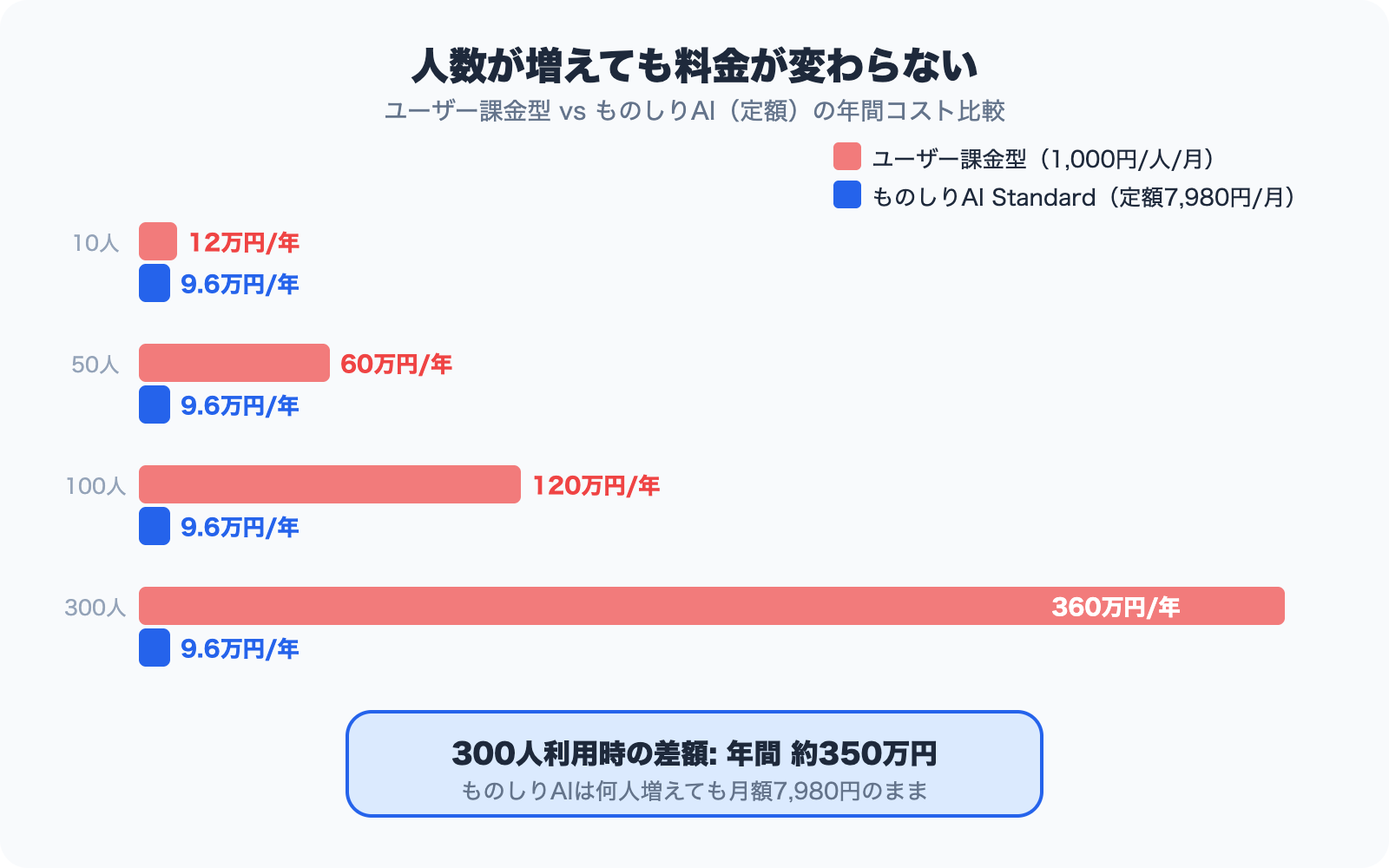
What started at $100/month for 10 users becomes $3,000/month for 300 -- $36,000 per year. The tool is exactly the same; only the headcount changed, yet costs jumped 30x.
If you have ever postponed company-wide rollout with "let's revisit this in next year's budget," you are not alone.
Three problems with limiting access to "just one team"
Restricting usage to keep costs down undermines the very purpose of the tool.
Information gaps emerge
Teams with access have up-to-date knowledge; teams without do not. When one department holds information others cannot reach, overall productivity suffers.
Administrative overhead increases
Who gets an account? What happens when someone transfers? What about departures? User management itself becomes an operational burden. Reassigning licenses with every personnel change is tedious but unavoidable.
The tool never reaches its full potential
A knowledge base gains value when the entire organization contributes. If only a few teams participate, coverage remains thin, searches come up empty, and usage declines -- a vicious cycle.
Three benefits of an unlimited-user model
A flat-rate pricing model that does not charge per user addresses all three problems at their root.
1. Predictable budgeting
Whether 10 or 300 people use the tool, the monthly cost stays the same. "We don't know how many new hires we'll have next quarter, but we need a firm budget" -- with flat-rate pricing, your estimate never changes, making approval straightforward.
2. No barrier to company-wide rollout
You can issue accounts to everyone without worrying about incremental costs. "Give it a try" becomes an easy ask, dramatically speeding adoption across the organization.
3. Maximum return on investment
When every employee has access to the same knowledge base, cross-departmental information sharing accelerates. Customer insights from Sales, FAQs from Support, technical docs from Engineering -- bringing them together in one place multiplies the knowledge base's value.
Monoshiri AI pricing
Monoshiri AI offers unlimited users on every plan. The Light plan starts at $29/month. Whether 50 or 300 people use it, the monthly fee stays the same.
Compare that with per-user pricing:
| Users | Per-user ($10/user/mo) | Monoshiri AI Light |
|---|---|---|
| 10 | $100 | $29 |
| 50 | $500 | $29 |
| 100 | $1,000 | $29 |
| 300 | $3,000 | $29 |
The more users you add, the wider the gap. At 300 users, the annual difference is roughly $35,000.
See full plan details on the pricing page and compare with other services on the comparison page.
Summary
Per-user SaaS pricing is easy to start with at small scale, but becomes a major obstacle when you aim for company-wide rollout. Restricting access to "just one team" leads to information silos, administrative overhead, and diminished ROI.
An unlimited-user pricing model lets you deploy across the entire organization without worrying about cost, unlocking the full value of your knowledge base. When evaluating tools, look beyond the per-seat price and ask: "What will this cost when the whole company uses it?"
Share this article
Related Articles
Best WordPress Chatbot Plugins: 10 Compared (2026), AI vs. Rule-Based
We compare 10 WordPress chatbot plugins using public WordPress.org data: AI vs. rule-based (scenario) chatbots, whether you need an API key or an account, answers from your own documents, and what 'free' covers, with picks by goal.
Which Cloud Knowledge Base Should You Choose? SMB Comparison and Buying Guide (2026)
For a small or midsize business, the cloud knowledge base to pick is one you can trial free and that does not charge per user. Here is why, plus selection criteria, picks by price tier, a comparison table, and a 5-step rollout.
Internal Wiki & Knowledge Management Tools Compared (2026): How to Choose for AI Search
A 2026 comparison of internal wikis and knowledge management tools. Use six selection criteria for AI knowledge bases (answer accuracy, pricing, access control, ease of adoption, Japanese-language accuracy, integrations) and a side-by-side comparison table to find the right fit.

![Dify vs Monoshiri AI -- Choosing the Right Internal Knowledge AI for Your Team [2026 Edition]](/blog/dify-vs-monoshiri/header.jpg)
![Enterprise AI Tool Selection Guide -- ChatGPT, Gemini, Claude, NotebookLM, Notion AI, and Monoshiri AI Compared [2026 Edition]](/blog/ai-tools-comparison-2026/header.jpg)
![How to Choose an Internal Knowledge Base -- 7 Comparison Points You Can't Afford to Miss [2026 Edition]](/blog/knowledge-base-comparison-2026/header.jpg)