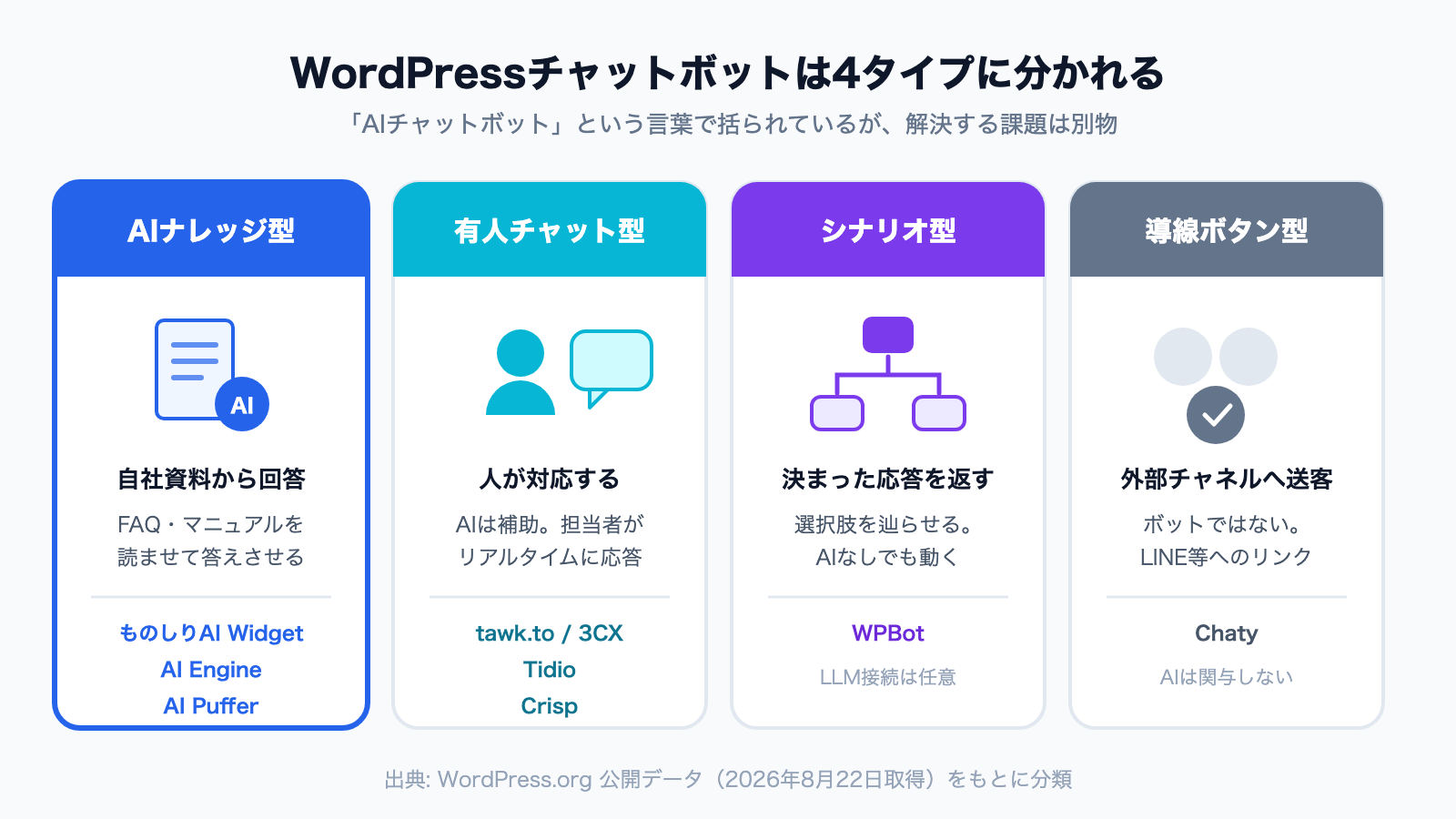
Search the official WordPress plugin directory for "chatbot" and you get over 1,400 results. Install a few of the top ones and you quickly notice they are fundamentally different products. Some will not say a word until you supply your own OpenAI API key. Some are not bots at all — they are link buttons that send visitors to WhatsApp or LINE. Some are human live chat tools where AI is a secondary feature. Some use no AI at all and answer by following branches you scripted in advance. They share a category label, but they solve different problems.
This article compares 10 representative plugins using public WordPress.org data and sets out which to pick for each goal. We also develop and publish a chatbot plugin in the official WordPress.org directory ourselves, so we have included the differences that do not show up in feature lists.
What you will learn
- The types of WordPress chatbot plugin, and how to tell them apart
- How AI chatbots differ from rule-based (scenario) chatbots, and which to choose
- A side-by-side table of install counts, ratings, update status, and specs for 10 plugins
- Which plugins are "free" but still bill you separately for AI usage or require an account
- The state of Japanese localization (how many of the 10 have every screen in Japanese)
- A decision flowchart for picking one
About the numbers: install counts, ratings, review counts, last-updated dates and language pack availability were retrieved from the WordPress.org plugin information API and translate.wordpress.org on October 3, 2026 (the first edition used data from August 22, 2026). Feature descriptions are based on what each product states on its official WordPress.org page and on each company's official pricing page. This is not a ranking of quality — it is a map of what each product is built for.
1. The short answer, by goal
| What you want | Type that fits | Recommended products |
|---|---|---|
| Answer questions from your own docs and FAQs | AI knowledge type | monoshiri AI / AI Engine / AI Puffer |
| Try it on your own site first, with no account or API key | AI knowledge type | monoshiri AI |
| Build AI features yourself, with a developer on hand | AI framework type | AI Engine / AI Puffer |
| Have humans answer chats | Human live chat type | tawk.to / 3CX / Crisp / Tidio |
| Use AI to lighten the load on human chat | Human chat + AI type | Tidio / Crisp (higher plans) |
| Return fixed answers to fixed questions (no AI) | Scenario type | WPBot (free version) |
| Just route visitors to WhatsApp or LINE | Channel button type | Chaty |
| Hand WordPress admin work to AI (not for visitors) | Admin AI agent | AI Agent by SiteGround |
Even when the request is "we want an AI chatbot," the real requirement — deflect support tickets, or capture leads — changes which type you should pick.
2. AI chatbots vs. rule-based (scenario) chatbots: the difference and how to choose
The first decision that trips people up is whether to go with an AI chatbot or a scenario chatbot. Both "answer automatically," but they are built differently and cost money in different ways.
- Scenario (rule-based): you prepare choices such as "About pricing" or "I want to book" and the answers behind them in advance, and visitors click buttons. No AI is involved. WPBot's built-in free features and the bot builders in Crisp and Tidio (no-code tools for assembling branches) fall into this group
- AI: you give the bot documents such as FAQs and manuals, and when a visitor types a question in their own words, it composes an answer from those documents. monoshiri AI, AI Engine, AI Puffer and Tidio's Lyro fall into this group
- Human live chat: as with tawk.to or 3CX, people reply to incoming messages in real time. It is not a bot, so the hours and staff you have are the hard limit
| Scenario (rule-based) | AI | |
|---|---|---|
| How questions come in | Visitors pick from buttons you prepared | Visitors type freely |
| What the answer is | Exactly what you wrote, word for word | Composed fresh from your documents each time |
| Unexpected questions | Cannot answer (not in the branches) | Can answer if your documents cover it |
| Preparation | Design and enter the questions and branches | Add your existing FAQ and manuals |
| When things change | Find and fix the affected scenarios | Replace the documents |
| Cost | No AI usage cost | Cost per answer (included in a plan, or metered) |
| Watch out for | Design and upkeep get heavier as branches multiply | Outdated or vague documents produce off-target answers |
When a scenario bot fits
- The goal is taking requests (store bookings, brochure requests, quote requests). The fields are fixed, and visitors just fill them in one by one
- Fields such as law, healthcare or finance where you need to control every word of the answer
- There are only a dozen or so question patterns, and you do not want to pay for AI
When an AI chatbot fits
- Questions vary, and your FAQ page has grown too long
- You have manuals and terms, but no time to design branches
- You want to answer what visitors ask in their own words ("Does this product work on a Mac?")
Thinking about cost and effort
A scenario bot's appeal is zero AI cost, but the effort concentrates in the initial design and in fixing scenarios every time your services change. Past a few dozen branches, it gets hard to tell where to make a fix. An AI chatbot starts working as soon as you add documents, but costs money per answer. Most products have a free tier, so the reliable approach is to collect real questions on your own site first and decide from there.
Using both
In practice it is common to combine them rather than pick one. For example, let AI give the first answer to common questions, send fixed procedures such as bookings or quotes to a form or scenario, and pass anything the AI cannot resolve to human chat or a contact form. monoshiri AI is an AI chatbot with no scenario-branching feature; it supports this kind of split with "suggested questions" that show common questions as buttons, and a link to your contact page that can sit in the chat window.
3. Five criteria that decide the choice
1. Do you need an AI API key, or an account with the service?
This is the first fork in the road. AI Engine and AI Puffer are built around a "bring your own API key" model: you create a developer account with OpenAI or Google, add a credit card, and manage metered billing yourself. The plugin is free, but AI usage is billed separately by the AI provider (AI Puffer now also offers its own cloud, "AI Puffer Cloud," with free credits).
SaaS products such as Tidio and Crisp need no API key, but they do need an account with the service. Since version 1.5.0 in September 2026, monoshiri AI can be started with one button, with no API key and no account.
That is where many site owners stop — being comfortable in WordPress does not mean being comfortable in the OpenAI console.
2. Can it answer from your own documents?
A general-purpose model gives general-purpose answers. To answer "what is your return policy" or "which OS does this product support," the AI needs your documents. Products differ in what they can ingest: some only read posts and pages on the site, others accept uploaded files such as PDFs.
3. Does it work end to end in your language?
An English admin screen is workable. It starts to matter when you hand the setup to a colleague, or when an agency delivers a site to a client. As shown below, Japanese support in particular is still close to an empty space in this market.
4. What exactly is "free"?
There are three kinds of free. (1) The plugin is free but you pay for AI usage (AI Engine, AI Puffer). (2) The service has a free tier (Tidio, Crisp, monoshiri AI). (3) Genuinely free end to end (tawk.to, 3CX, Chaty, WPBot's free version) — which is possible only for human chat, link buttons and scenario bots, since they carry no inference cost.
5. Is it still maintained?
WordPress ships major releases several times a year. A plugin last updated over a year ago carries real risk on current WordPress and PHP versions. Always check the "last updated" column.
4. The comparison table
Public WordPress.org data, retrieved October 3, 2026. Install counts follow WordPress.org's own rounded notation.
| Plugin | Active installs | Rating | Reviews | Last updated | Type |
|---|---|---|---|---|---|
| AI Agent by SiteGround | 1,000,000+ | 1.6 | 97 | 2026-09-30 | Admin AI agent (not for visitors) |
| Chaty | 300,000+ | 5.0 | 1,241 | 2026-09-29 | Channel button |
| tawk.to Live Chat | 100,000+ | 4.6 | 142 | 2026-01-14 | Human live chat |
| 3CX Free Live Chat | 100,000+ | 4.6 | 821 | 2026-06-29 | Human live chat |
| AI Engine | 90,000+ | 4.9 | 869 | 2026-10-01 | AI framework |
| Tidio | 70,000+ | 4.7 | 396 | 2026-09-01 | Human chat + AI |
| Crisp | 20,000+ | 4.6 | 73 | 2025-04-14 | Human chat + scenario (AI on higher plans) |
| AI Puffer (formerly AI Power) | 10,000+ | 4.6 | 165 | 2026-10-02 | AI framework |
| WPBot | 5,000+ | 4.7 | 124 | 2026-09-30 | Scenario + AI |
| monoshiri AI | Under 10 | No rating | 0 | 2026-09-30 | AI knowledge |
And the specification side:
| Plugin | Answers from your docs | What you need to start | AI usage cost | Official Japanese language pack |
|---|---|---|---|---|
| AI Engine | Yes (embeddings etc. in Pro) | An OpenAI-style API key | Metered, on you | Yes (about 40% of current text) |
| AI Puffer | Yes (posts, pages, PDFs, files) | An API key, or an AI Puffer Cloud account | Metered, on you / credits | None |
| WPBot | Partly (mostly in the paid tier) | Nothing (the free version runs as scenarios) | On you, if you use AI | None |
| Tidio | Yes (Lyro AI agent) | A Tidio account | Free plan: 50 conversations in total, then included in plan | None |
| Crisp | Yes, on higher plans | A Crisp account | Included in higher plans (no AI on the free plan) | None |
| tawk.to | Knowledge base (human-first) | A tawk.to account | Free | None |
| 3CX Free Live Chat | Human-first | A 3CX account | Free | Older versions only (current version untranslated) |
| Chaty | N/A (not a bot) | Nothing | Free | None |
| AI Agent by SiteGround | N/A (for admin work) | A SiteGround AI Studio account | Depends on AI Studio plan | None |
| monoshiri AI | Yes (posts and pages + PDF, Word, Excel and more) | Nothing (one button; sign up only to get more answers) | Free up to 50 answers a month with no account | Yes (every string translated) |
On Japanese localization: we checked the official translations on translate.wordpress.org on October 3, 2026. Three products have a Japanese language pack — AI Engine, 3CX and monoshiri AI — but AI Engine has 338 of its 946 current interface strings translated (about 40%), and 3CX's pack was made for an old 2019 version, leaving the current version's text untranslated. monoshiri AI was the only one with every string translated.
5. Product notes
AI Engine — the default choice when you want to build
90,000+ active installs and a 4.9 rating across 869 reviews make this the most widely endorsed AI plugin in the category. It connects to OpenAI, Anthropic, Google, and Mistral, and covers far more than chat: content generation, AI forms, and MCP support. With REST endpoints and function calling, it is designed to be extended by developers. Embeddings (vector search) for answering from documents and the feature that lets the AI use your site content are Pro features.
Good fit: you have a developer, you want to control model behavior, you want to choose the model. Poor fit: you do not want to open an OpenAI account and manage metered billing.
AI Puffer (formerly AI Power) — all-in-one, explicit about training on your data
Publicly built around a "Bring Your Own API Key" model, supporting OpenAI, Gemini, Azure, OpenRouter, DeepSeek, xAI, and Ollama. It states that you can build a knowledge base from posts, pages, products, PDFs, and files. You can now also choose "AI Puffer Cloud," an optional cloud with monthly free credits, so there is a way to try it without an API key. Beyond chat it includes an AI writer, image generation, and WooCommerce tooling.
Good fit: you want one plugin to cover everything AI, and you want to pick your model. Poor fit: you would rather not navigate a large feature surface, or you want to run it with Japanese screens.
WPBot — the leading scenario bot that works without an LLM
Explicitly documented as working with or without an LLM service. Its built-in automated support, lead capture, and data collection can run at no additional cost, making it the archetype of the scenario type described above. You can connect OpenAI, Gemini, OpenRouter, DialogFlow and others later.
Good fit: fixed responses are enough for now, and you want zero AI spend. Poor fit: you need open-ended answers grounded in your own documents (that is mostly a paid-tier feature).
Tidio — human chat with AI on top
Human live chat is the main event, with the Lyro AI agent automating inquiries. You can also build scenarios in its no-code bot builder. The WordPress plugin is the entry point; the product itself is a SaaS. According to its official pricing page, Lyro on the free plan is limited to 50 conversations in total (not per month). Its WordPress.org page lists six widget languages: English, German, French, Spanish, Italian and Portuguese.
Good fit: humans will handle chat, and you want AI to reduce that load. Poor fit: you want fully unattended operation, or Japanese-language operation matters to you.
tawk.to — genuinely free human chat
Advertises unlimited messaging, ticketing, and a knowledge base as 100% free, with over 5 million companies using it. Note that its last update was January 2026, a longer gap than most of the 10 products compared.
Good fit: zero budget, humans answering. Poor fit: you want AI to answer automatically.
3CX Free Live Chat — chat that escalates to calls
821 reviews at 4.6. Besides escalating a chat into a voice or video call, it receives WhatsApp, Facebook and SMS messages on the same screen. Human-led by design.
Crisp — live chat with a free tier, plus bots
The free plan includes live chat, real-time notifications, a no-code scenario bot, and desktop/mobile apps. According to its official pricing page, AI-powered automated answers start with the higher Essentials plan (95 USD per month). Its last update was April 2025, the largest gap in this comparison — worth verifying against your current WordPress version before rollout.
Chaty — not a chatbot
300,000+ installs and a 5.0 rating across 1,241 reviews stand out, but this plugin places buttons that route visitors to WhatsApp, Facebook Messenger, LINE, Telegram, and 20+ other channels. No AI is involved. It ranks highly in searches for "chatbot," so it is easy to shortlist by mistake. If your requirement is "let AI answer," it is out of scope.
Good fit: you want to drive traffic to a messaging channel you already run.
AI Agent by SiteGround — AI for admin work, not for visitors
At 1,000,000+ active installs it leads this comparison, but its current WordPress.org page describes it as an agent that site owners use from the admin to have AI create posts, set SEO metadata, process WooCommerce orders and so on. It is not a chatbot that answers visitor questions. It works on any host, but requires a SiteGround AI Studio account. Its rating is 1.6 across 97 reviews, a notable gap between install count and rating. It ranks high in searches for "chatbot," but if your goal is serving visitors, it is out of scope.
monoshiri AI — answers from your own material, with no account and no API key
This is our own product, so here are the honest numbers: published May 19, 2026, fewer than 10 active installs, zero reviews. On adoption and track record it is nowhere near the products above. Its WordPress.org listing name is "Free AI Chatbot for Support and FAQ – monoshiri AI" (the Japanese listing reads 「無料 AI チャットボット「ものしり AI」– FAQ・お問い合わせを自動応答」), and you can find it by searching for "monoshiri AI" on the Add New Plugin screen.
The design difference is that you can deploy a chatbot that answers from your own site's content with no account, no API key and no code to copy. Since version 1.5.0 in September 2026, you start by pressing the "Agree and start for free" button on the settings screen. Your published posts and pages are sent to the AI, and a setup guide walks you through the rest in order (Start → Your WordPress content → Other documents → Display → Try it). You can also upload files such as PDF, Word and Excel, or type short facts such as business hours, right from the WordPress admin. When you publish or update a post, the change reaches the AI about 30 seconds later (automatic sync, on by default for sites started without an account).
With no account, the free allowance is 50 answers a month. Sign up with "Sign up to get more answers" and it grows to 150 answers a month, the same as the free plan, with the chatbot, content and conversation logs carried over as they are. Paid plans (from 2,980 JPY per month for 1,000 answers) can be chosen after signing up. On the free tier you can add up to 30 documents. If you already have a monoshiri AI account, connect with "Log in." The conditions for using it without an account are set out in the WordPress plugin terms.
Its screens are fully translated into Japanese through the official translation on translate.wordpress.org.
Good fit: you want to put off both an OpenAI account and signing up, and try it on your own site first; you want answers grounded in your own documents; you want to operate in Japanese. Poor fit: adoption numbers and reviews are decisive for you, you want to build detailed scenarios (branches), or you want fine-grained control of AI behavior.
6. API key billing and account billing behave differently
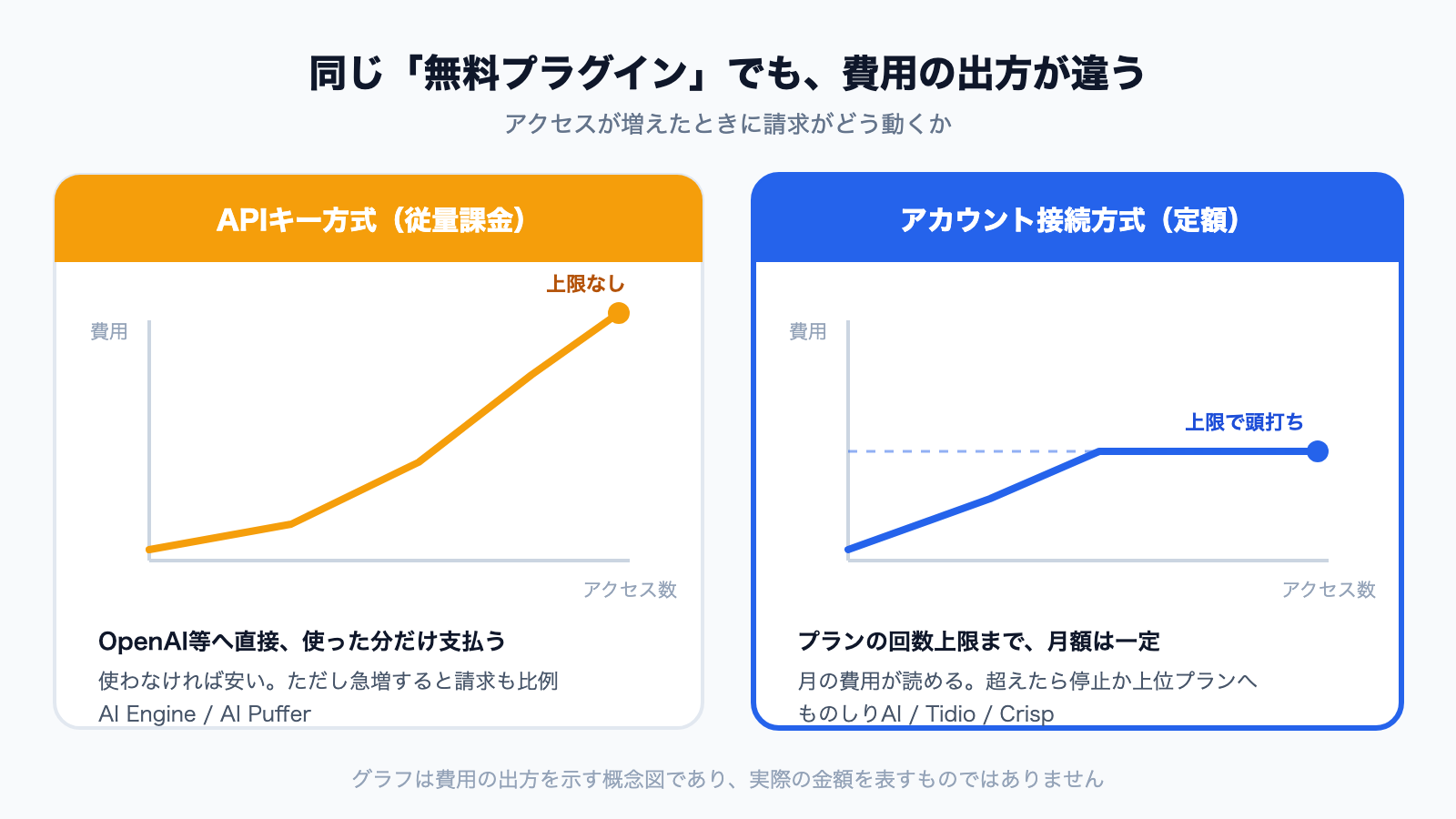
Two "free plugins" can produce very different invoices.
The difference is obvious once you look at the actual admin screens. Above is the API key model (AI Engine); below is the connection model (monoshiri AI).
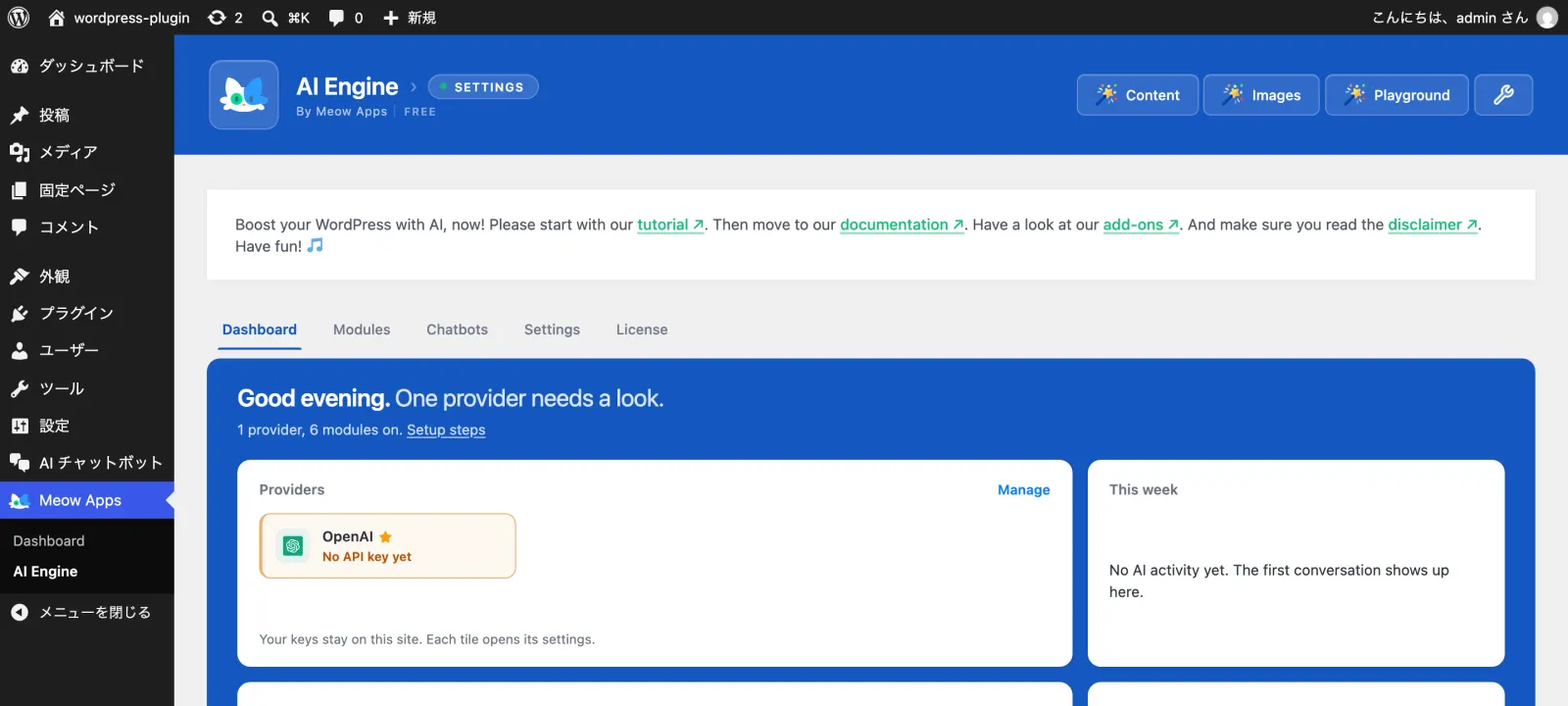
With AI Engine, nothing responds until you register an API key from OpenAI or a similar provider. The same screenshot also shows that even with WordPress set to Japanese, much of the plugin's own interface remains in English — the "Japanese language pack exists, but covers only about 40% of the current text" situation noted in the comparison table.
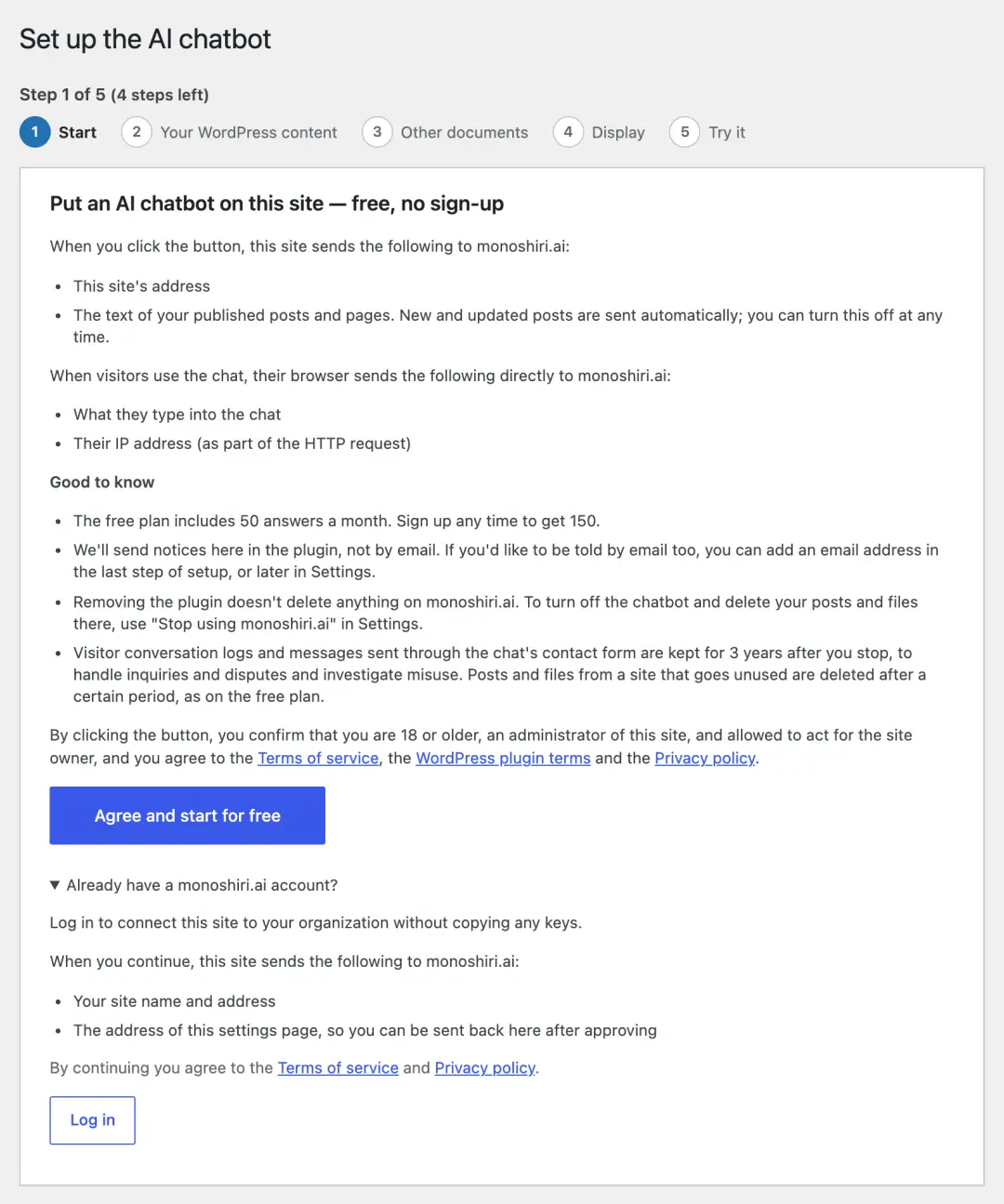
In the connection model there is no API key field at all. With monoshiri AI, you check what will be sent and press "Agree and start for free," and setup begins without even creating an account.
API key model (AI Engine, AI Puffer)
- Plugin: free
- AI usage: metered, paid directly to the AI provider
- Character: extremely cheap when idle, but a traffic spike scales the bill with it, so spending limits need managing
Account model (Tidio, Crisp, monoshiri AI, and others)
- Plugin: free
- AI usage: included in the plan, with a usage cap
- Character: predictable monthly cost; exceeding the cap either stops service or prompts an upgrade. monoshiri AI runs on a free allowance before you even create an account
For a small site where an unexpected invoice is the main fear, the account model fits. Where traffic is well understood and unit cost matters, the API key model wins.
For reference, monoshiri AI answers up to 50 questions a month with no account, and up to 150 a month on the free plan once you sign up. Paid plans start at 2,980 JPY per month for 1,000 answers, with unlimited users. See Pricing for details.
7. Japanese localization is still close to an empty space
The most surprising finding: of the 10 plugins compared, only three have an official Japanese language pack on WordPress.org, and only one of those has every screen in Japanese.
In a market where products carry 100,000 to 1,000,000 installs, localized UI and documentation are still not standard. An English admin screen is usable, but the gap shows up when you:
- hand the configuration to another team member
- deliver a site to a client who will operate it
- need to troubleshoot in your own language
If local-language operation matters to you, make UI and documentation language an explicit selection criterion.
8. Decision flowchart
- Should it answer visitor questions automatically?
- No, humans will → tawk.to (budget) / 3CX / Tidio / Crisp
- No, I just want to route to LINE or WhatsApp → Chaty
- No, I want AI to handle WordPress admin work → AI Agent by SiteGround
- Yes → go to 2
- Are the question patterns fixed, and do you want to control every word of the answer?
- Yes (taking bookings, brochure requests and so on) → Scenario type: WPBot (free version), or the bot builders in Tidio / Crisp
- No, I want free-form answers from my own documents and FAQs → go to 3
- Can you supply and manage an OpenAI-style API key?
- Yes → AI Engine (control) / AI Puffer (all-in-one)
- No → go to 4
- Do you want to run it together with human chat?
- Yes → Tidio (Lyro) / Crisp (higher plans)
- No, I want to try it first without signing up, or run it with Japanese screens → monoshiri AI
Summary
- WordPress chatbot plugins split into AI knowledge, AI framework, human live chat, scenario, and channel button types. The results for "chatbot" also include admin AI tools that are not for visitors
- AI and scenario chatbots differ in how they are built and what they cost. Scenario bots for fixed procedures, AI for answering varied questions from your documents. Combining them is common
- The biggest fork is whether you have to supply an AI API key or an account yourself. It halves the candidate list
- "Free" comes in three flavors, and some free plugins still bill you for AI usage
- Always check last updated. Anything over a year old needs verification
- Products with every screen in Japanese are still rare. If Japanese-language operation matters, make it a criterion
Our own monoshiri AI is built around one idea: deploy a chatbot that answers from your own documents, in Japanese, with no account and no API key. Install it free from WordPress.org, press "Agree and start for free," and you can use up to 50 answers a month for free — 150 once you sign up. Setup details are documented on how to add an AI chatbot to WordPress.
If you want to understand what "free" covers before comparing products, see How to add a chatbot to WordPress for free: three approaches compared.
Frequently asked questions
Can you use a WordPress chatbot for free?
Yes, but "free" means different things per product. Some services are free in themselves (tawk.to, 3CX Free Live Chat). Some ship a free plugin but bill you separately for OpenAI API usage (AI Engine). Others are free up to a quota and paid beyond it (Tidio, monoshiri AI). monoshiri AI answers up to 50 questions a month with no account, and up to 150 a month once you sign up. Check which type you are getting before you start.
Should I choose an AI chatbot or a rule-based (scenario) chatbot?
If there are only a few question patterns and you want to control every word of the answer (taking bookings or brochure requests, for example), a rule-based scenario bot fits. If questions vary and you want free-text answers drawn from your FAQ and manuals, an AI chatbot fits. Scenario bots have no AI usage cost but take effort to design; AI chatbots start as soon as you add documents but cost money per answer. Many sites combine them: AI handles the first answer, and fixed procedures go to a form or a human.
Do you need to edit code to add a chatbot to WordPress?
Usually not. Installing and activating a plugin from Plugins → Add New in the WordPress admin is enough. Even when you use an embed snippet from an external service, you do not have to edit your theme's PHP files — you can paste it from a widget or the plugin's settings screen.
Can a free plugin answer from your own documents and FAQ?
Yes. Of the 10 products compared, AI Engine, AI Puffer, Tidio (with its Lyro AI agent), Crisp (on higher plans) and monoshiri AI can answer from your own content. What they can ingest and how they charge differ, though: some read only posts and pages, while others also accept files such as PDF and Word.
Do you always need an OpenAI API key?
It depends on the product. AI Engine requires you to bring your own OpenAI (or similar) API key, so AI usage is billed to you per use. AI Puffer is also built around bringing your own key, but you can choose AI Puffer Cloud, which comes with free credits. Tidio and Crisp need an account with the service, and the AI cost is included in their plans. monoshiri AI needs neither an API key nor an account: one "Agree and start for free" button gets you started. WPBot also runs as a scenario bot with no key at all.
Are there WordPress chatbot plugins that support Japanese?
As of October 2026, three of the 10 compared products have an official Japanese language pack on WordPress.org: AI Engine, 3CX Free Live Chat and monoshiri AI. However, AI Engine covers only about 40% of its current interface text, and 3CX's pack was made for an older version, so most of their screens stay in English. monoshiri AI was the only one with every interface string translated into Japanese.
Do chatbot plugins work on WordPress.com?
It depends on the plan. The free and Personal plans on WordPress.com restrict plugin installation and JavaScript, so they will not work. You need the Business plan or above, or a self-hosted WordPress.org install on your own server.
Share this article
Related Articles
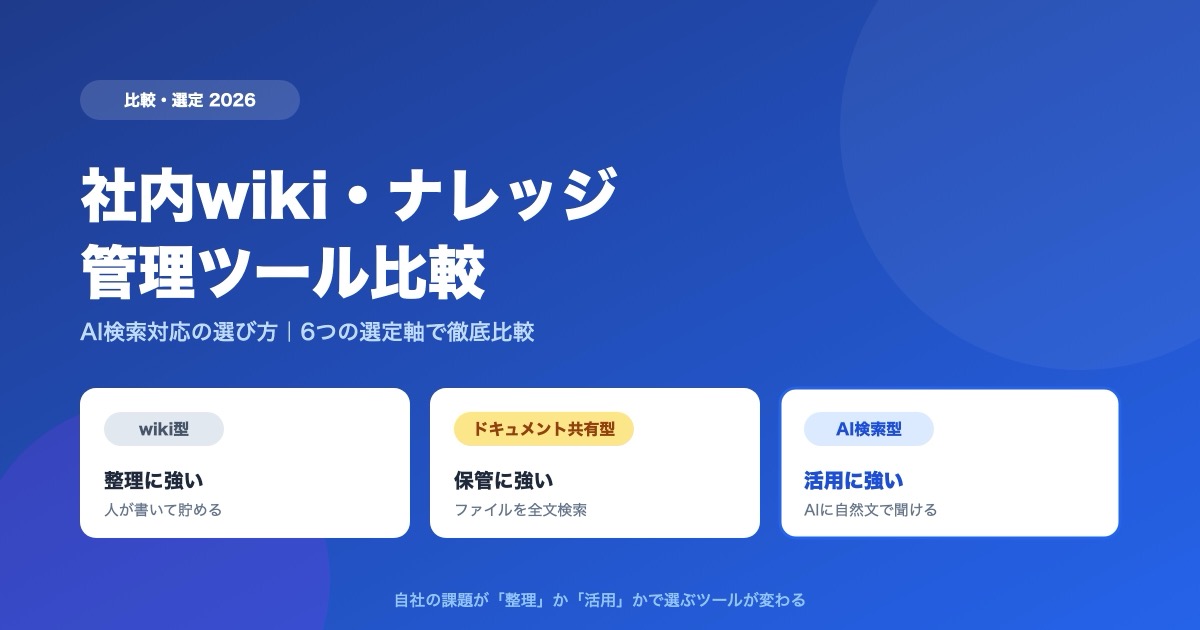
Internal Wiki & Knowledge Management Tools Compared (2026): How to Choose for AI Search
A 2026 comparison of internal wikis and knowledge management tools. Use six selection criteria for AI knowledge bases (answer accuracy, pricing, access control, ease of adoption, Japanese-language accuracy, integrations) and a side-by-side comparison table to find the right fit.
![Dify vs Monoshiri AI -- Choosing the Right Internal Knowledge AI for Your Team [2026 Edition]](/blog/dify-vs-monoshiri/header.jpg)
Dify vs Monoshiri AI -- Choosing the Right Internal Knowledge AI for Your Team [2026 Edition]
A practical comparison of Dify and Monoshiri AI across setup effort, Slack integration, knowledge ingestion, and model selection. Find out which fits engineering-led teams and which fits IT and business-led teams.
![How to Choose an Internal Knowledge Base -- 7 Comparison Points You Can't Afford to Miss [2026 Edition]](/blog/knowledge-base-comparison-2026/header.jpg)
How to Choose an Internal Knowledge Base -- 7 Comparison Points You Can't Afford to Miss [2026 Edition]
A practical guide to choosing the right knowledge base for your company. Covers seven evaluation criteria -- from pricing models and security to integrations -- that also double as material for internal approval documents.

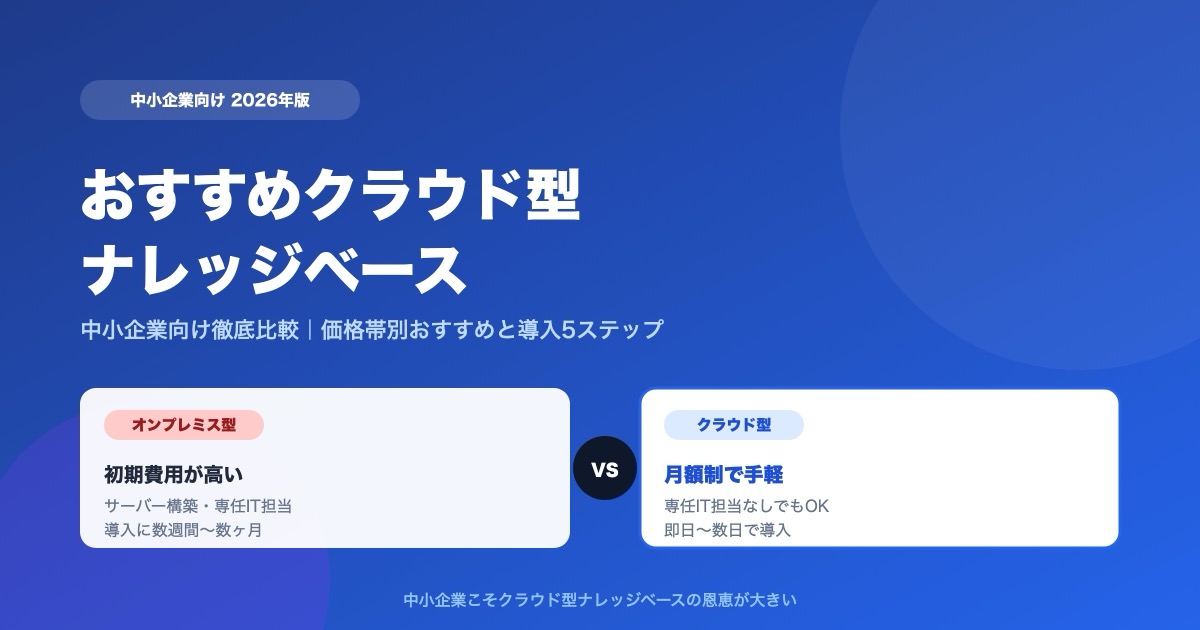

![Enterprise AI Tool Selection Guide -- ChatGPT, Gemini, Claude, NotebookLM, Notion AI, and Monoshiri AI Compared [2026 Edition]](/blog/ai-tools-comparison-2026/header.jpg)