You load your internal documents into an AI, and then: "it's right there in the document, but the AI won't answer," or worse, "the answer sounds right but it's wrong."
Often the cause is the documents themselves. But the usual advice -- "write in clean prose," "explain things thoroughly" -- barely moves the needle. In fact, a polite, thorough preamble actively hurts.
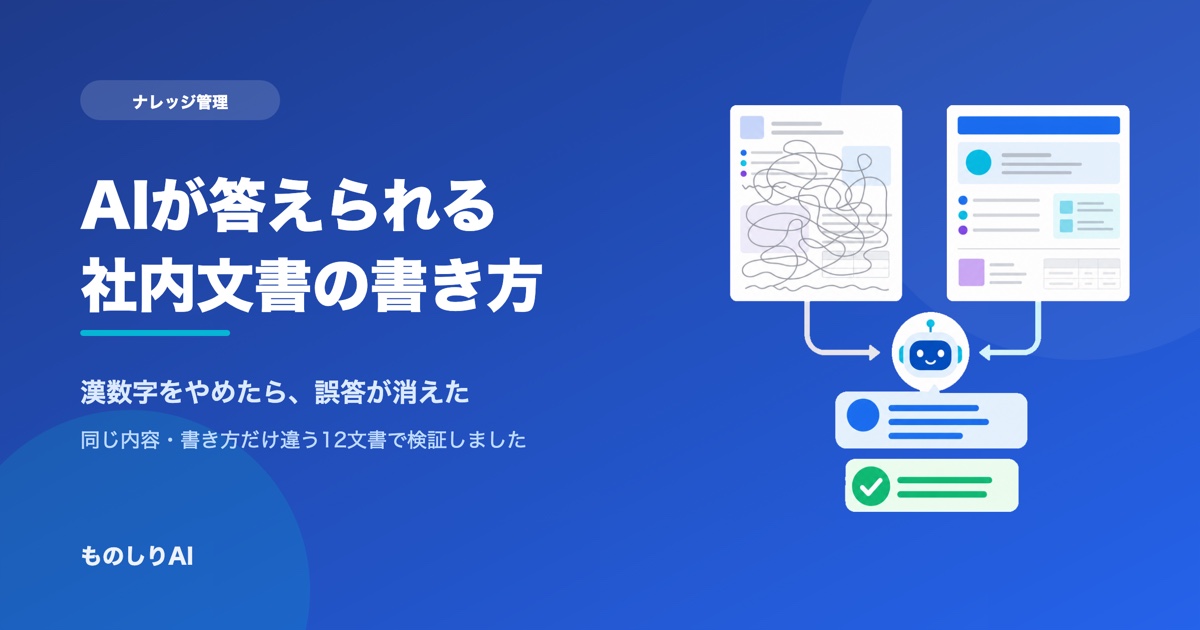
So we ran a test. We prepared two sets of 12 internal policy documents containing the same facts and the same amount of information, differing only in how they were written, loaded both into Monoshiri AI, and asked both sets the same questions. This article covers what actually mattered, ordered by impact.
What you'll learn
- How much answer accuracy actually changes when you change the writing
- The surprising thing that was breaking accuracy the most
- What the AI is actually looking at when it decides which document to open
- Seven rules and a template you can apply tomorrow
1. How we tested
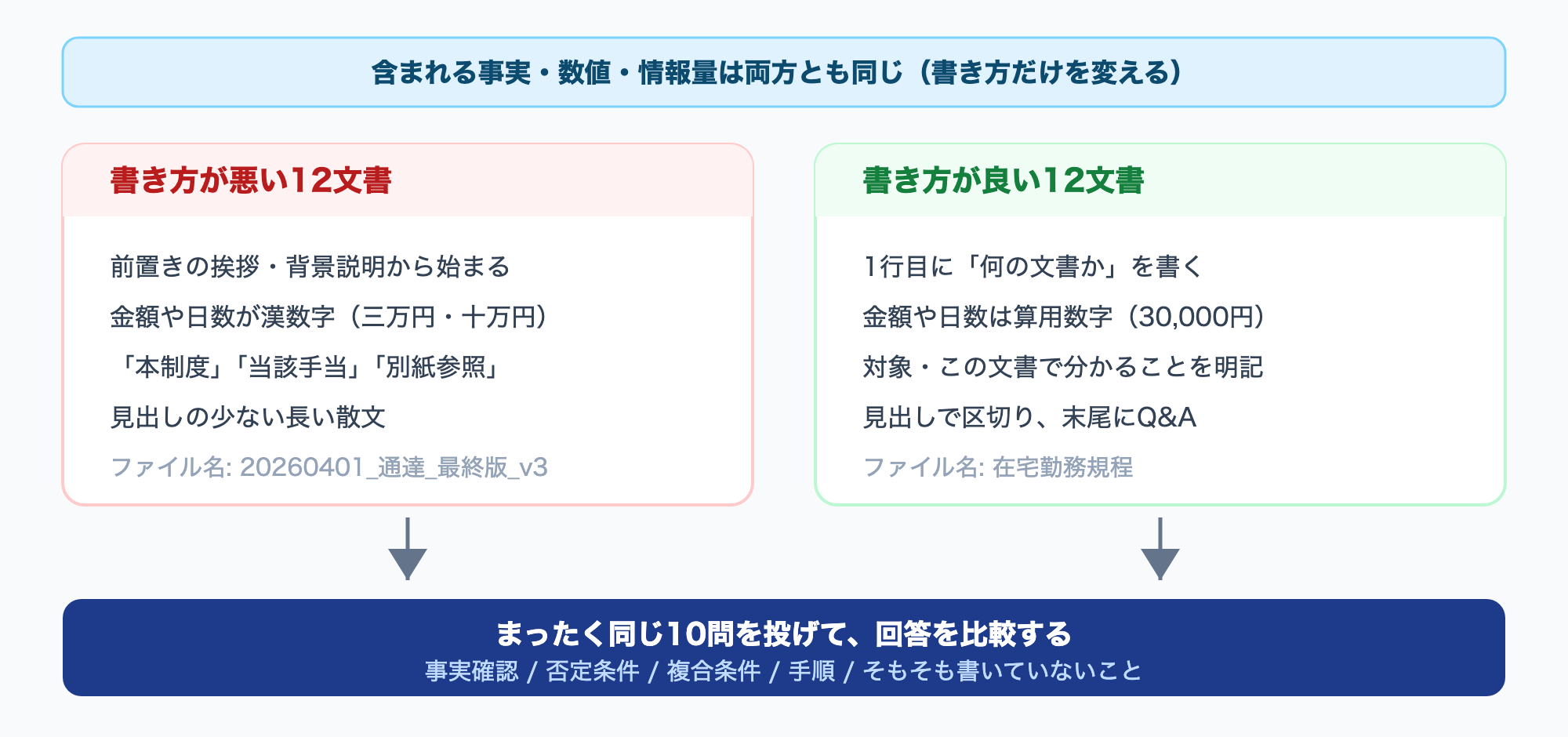
We wrote 12 internal policy documents for a fictional company (5 HR, 4 expense, 3 IT) in two versions.
| Badly written set | Well written set | |
|---|---|---|
| Opening | Greetings and background ("Thank you for your continued efforts...") | What this document is, who it applies to, what it answers |
| Structure | Long prose with few headings | Sectioned by headings, Q&A at the end |
| Numbers | Kanji numerals (三万円 = "thirty thousand yen" spelled out in characters) | Arabic numerals (30,000 yen) |
| Wording | "this policy," "the said allowance," "see the separate attachment" | Proper nouns written out in full |
| Filename | 20260401_notice_final_v3 |
Work-from-Home Policy |
| Total length | 7,427 characters | 8,231 characters |
The critical point: both sets contain the same facts and the same figures. With information held constant, only the writing differs.
We then asked 10 questions covering factual lookup, negative conditions, compound conditions, procedures, and things that simply aren't written anywhere.
2. Result: "Even badly written documents got 8-9 out of 10 right"
Let's start with the result most people find surprising.
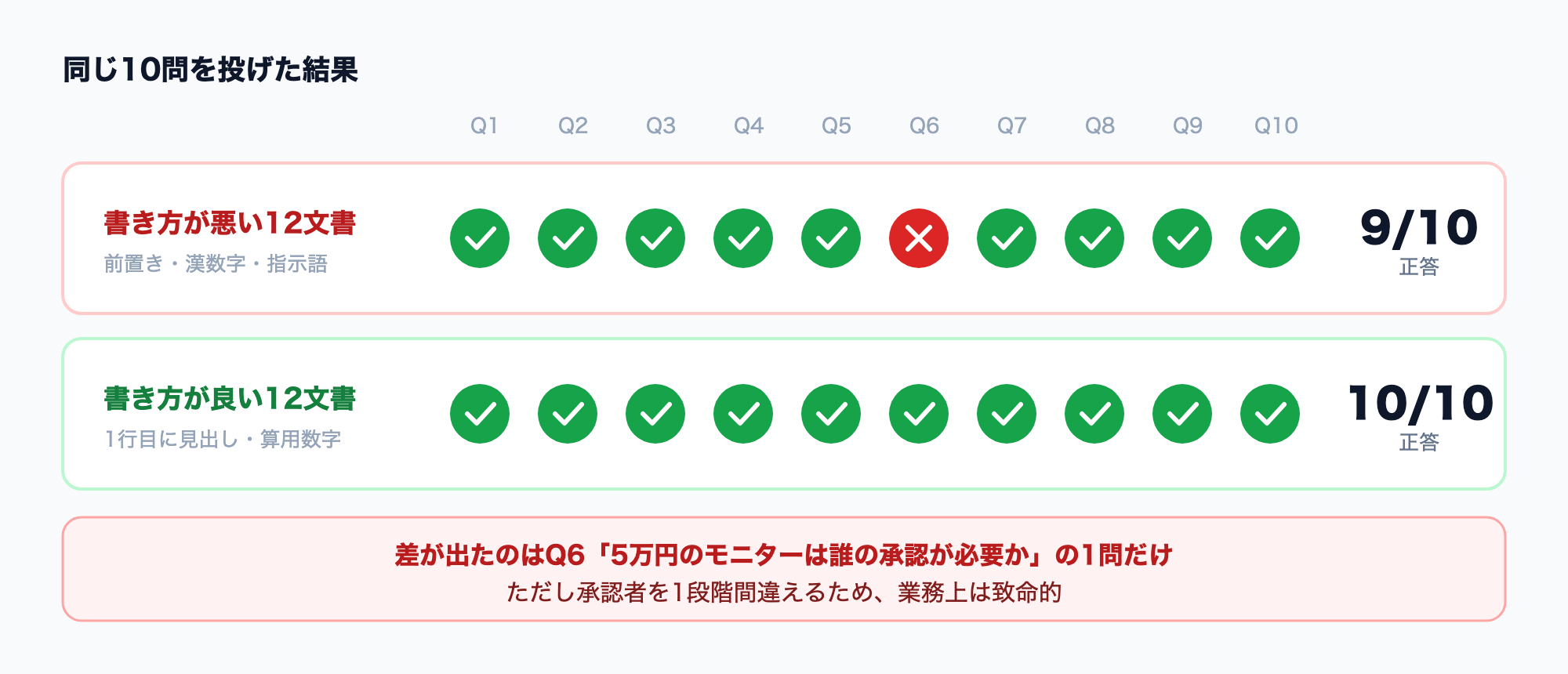
9 of the 10 questions were answered correctly even by the badly written set.
Long preambles, pronouns everywhere, no headings -- as long as the fact was written down somewhere, the AI answered. Monoshiri AI reads the full document before answering (skill mode / Corpus2Skill), which makes it more tolerant of poor writing than approaches that slice documents into fragments and pass along only a piece.
In other words, you do not need to rewrite every document before adopting AI. That is the first conclusion, and it removes the most common reason teams stall.
But the one question that did differ mattered a great deal in practice.
3. The single critical error: spelled-out numbers
Here is the question where the two sets diverged.
"I want to buy a 50,000-yen monitor. Whose approval do I need?"
The correct answer under the policy is "department head" (30,000-100,000 yen requires the department head; 100,000-500,000 yen requires the division head).
The badly written set answered:
Purchasing a 50,000-yen monitor requires division head approval, as the amount falls in the range of one hundred thousand to five hundred thousand yen.
That is wrong -- and wrong in a particularly awkward way: it escalates the approver by one level.
Isolating the cause
To determine whether the culprit was the poor prose or the number notation, we prepared an additional set that kept the bad writing exactly as it was and changed only the kanji numerals to Arabic numerals, then asked the same question three times each.
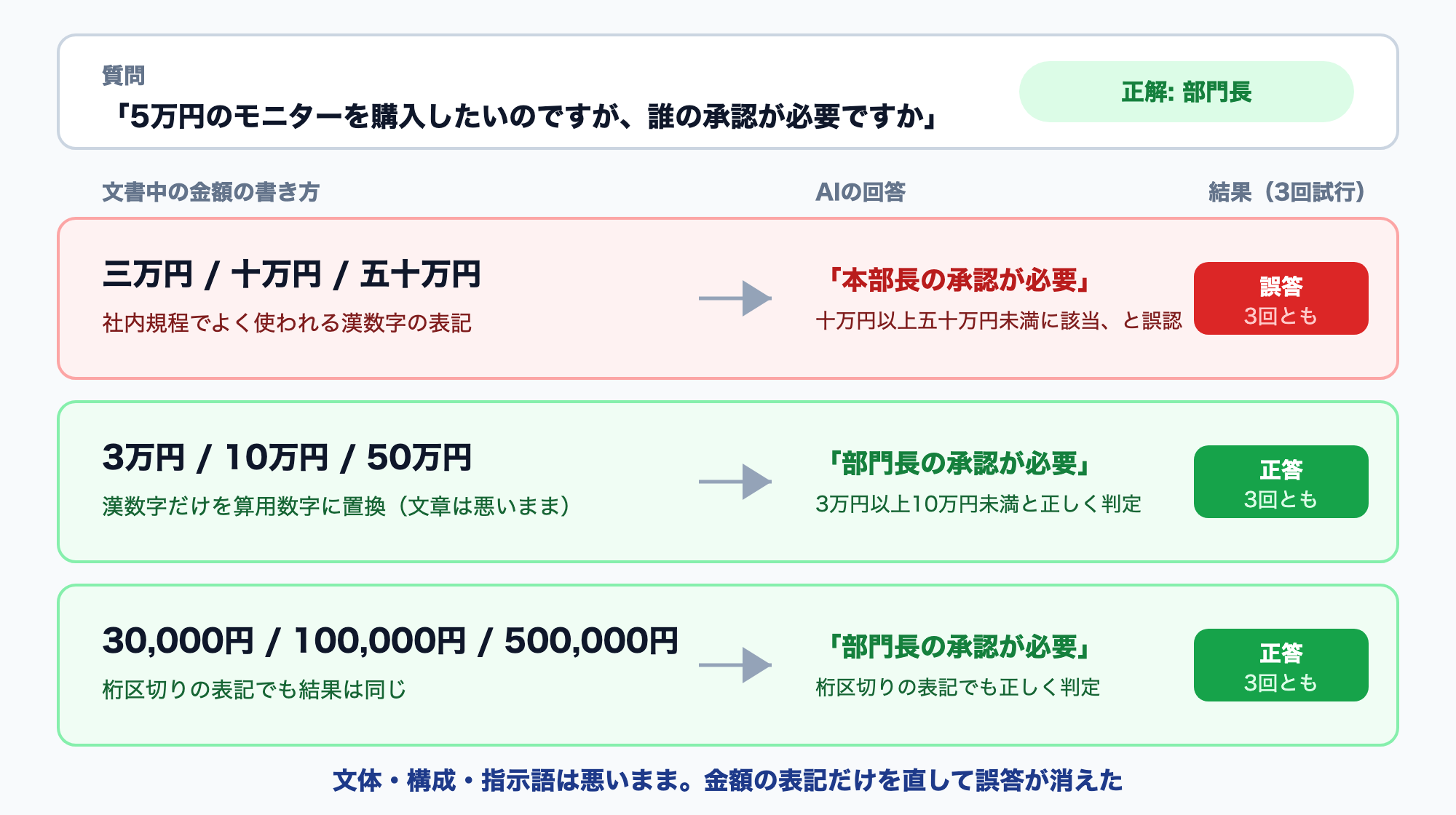
| How amounts were written | Answer | Result |
|---|---|---|
| 三万円 / 十万円 / 五十万円 (kanji numerals) | "Division head approval" | Wrong, all 3 times |
| 3万円 / 10万円 / 50万円 | "Department head approval" | Correct, all 3 times |
| 30,000円 / 100,000円 / 500,000円 | "Department head approval" | Correct, all 3 times |
With the prose, structure, and pronouns left untouched, simply fixing the number notation made the error disappear.
All three trials produced the identical wrong answer, so this was not random variation. Asked about "50,000 yen," the model mapped it onto the kanji range "one hundred thousand to five hundred thousand."
Why this is dangerous
This failure takes the form of correct reasoning applied to the wrong bracket. The answer reads coherently and confidently, so the person reading it has no way to notice. That is more troublesome in practice than an AI that obviously makes things up.
Note that the "万" (ten-thousand) unit notation itself was fine. You do not need to convert everything to 100,000円. Dropping kanji numerals is enough.
The quick fix
Japanese internal policies, notices, and minutes are conventionally written with kanji numerals. A single find-and-replace pass is enough:
- 三万円 → 3万円 (30,000 yen)
- 六か月 → 6か月 (6 months)
- 九十三日 → 93日 (93 days)
- 二社以上 → 2社以上 (2 or more vendors)
If your documents are in English, the equivalent risk is spelling numbers out as words ("thirty thousand dollars") instead of using digits. Use digits.
4. The AI picks documents by looking only at the first line
There was a second finding with direct practical consequences.
One more question the badly written set failed:
"How much does the company pay when a child is born?"
The answer came back: "This is not stated in the documents." But the information is there -- the condolence-and-congratulation document states "10,000 yen in the case of childbirth." It was written down, and the AI could not reach it.
The reason lies in what the AI looks at when choosing documents.
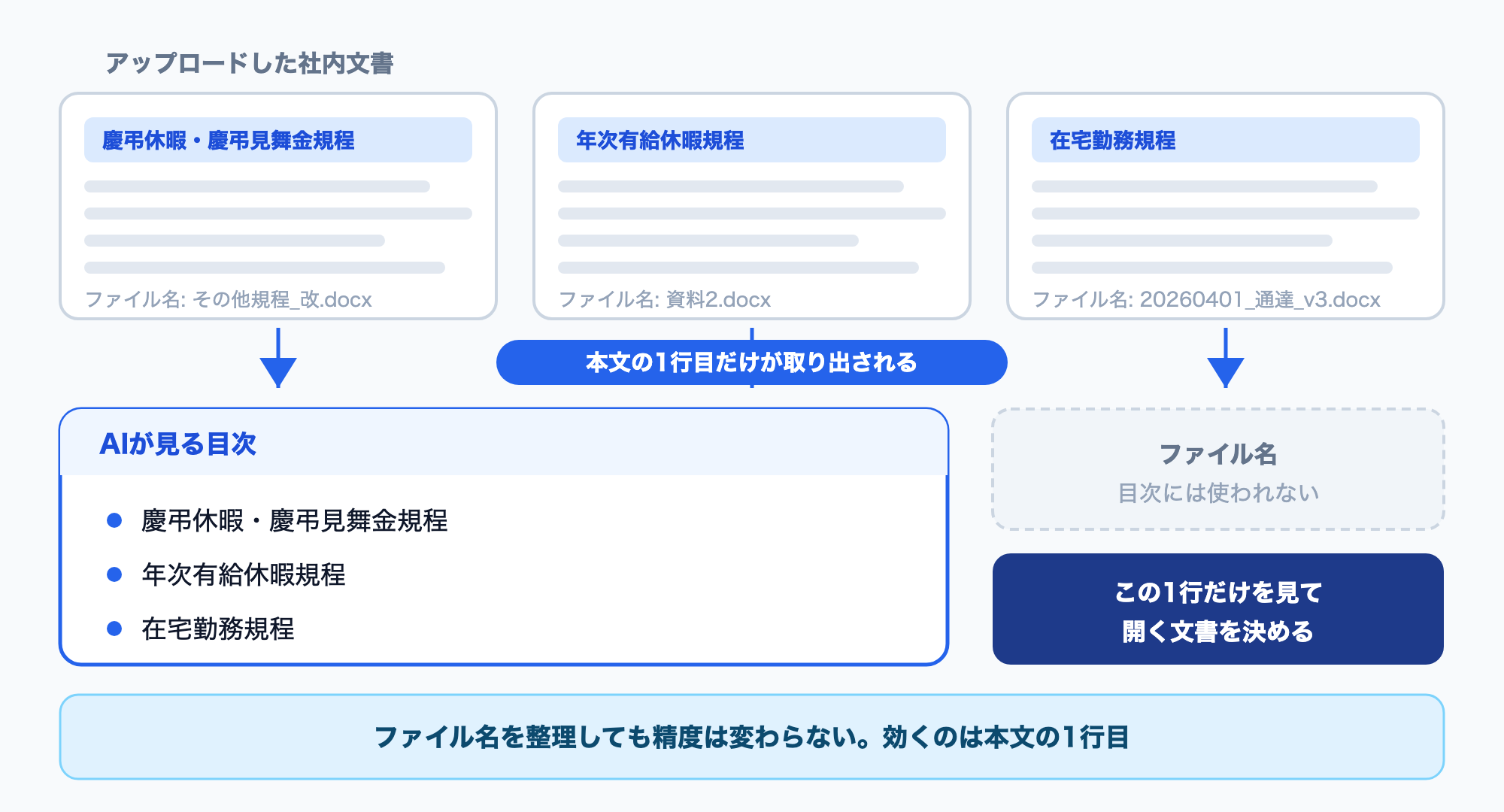
When a question comes in, Monoshiri AI picks relevant documents from a "table of contents." What appears in that table of contents is the first line of each document.
| Table of contents, badly written set | Table of contents, well written set |
|---|---|
| Regarding the handling of condolences and congratulations | Condolence & Congratulation Leave and Gift Money Policy |
| Materials on taking leave | Annual Paid Leave Policy |
| Guidance on childcare and nursing care | Childcare and Nursing Care Leave Policy |
"Regarding the handling of condolences and congratulations" gives no signal that childbirth gift money is inside. "Condolence & Congratulation Leave and Gift Money Policy" does -- the words "gift money" are enough to get there.
Cleaning up filenames does nothing
This is the part that gets overlooked. Filenames are not used in this decision.
Renaming 20260401_notice_final_v3.docx to Work-from-Home Policy.docx is good hygiene for humans, but it does not change the AI's accuracy. What works is the first line of the document body.
Rather than spending time reorganizing files, add a one-line title to the top of each document. The return is far higher.
5. Don't agonize over terminology consistency
Conventional wisdom says you should standardize internal vocabulary before feeding documents to an AI. In our test, tolerance for paraphrasing was high.
| Word used in the question | Word used in the document | Result |
|---|---|---|
| Telework | Work from home | Answered correctly |
| Remote work allowance | Work-from-home allowance | Answered correctly |
| Phone (colloquial) | Smartphone / device | Answered correctly |
You can deprioritize the work of predicting how employees will phrase things and standardizing terms accordingly. These seven items come first.
6. Seven rules for writing internal documents (ordered by impact)
1. Don't use spelled-out numbers
Top priority. Amounts, days, headcounts, times -- use digits. This alone reduces errors in approval brackets and day counts.
2. Put a title in the first line that shows what the document can answer
Something like # Condolence & Congratulation Leave and Gift Money Policy, where the first line signals what questions the document covers. The first line of the body -- not the filename.
3. One topic per file
The AI decides document by document whether to open or skip. If work-from-home, business travel, and expense reimbursement all live in one file, information outside the document it lands on gets missed.
4. State "who it applies to" and "what this document answers" at the top
Do not open with greetings, background, or the intent behind the policy. The AI uses the opening of a document to classify it, so if that space is filled with preamble, the content is not recognized correctly.
5. Spell out what is not allowed
If "employees in their probation period are not eligible" and "using personal PCs for work is prohibited" are written down, the AI can answer "no." If they are not, it may look only at the conditions under which something is allowed and wrongly say yes.
People who write policies tend to document what is permitted. What employees ask is whether they are permitted.
6. Add likely questions as a Q&A at the end
When text close to how people actually phrase the question exists in the body, the AI reaches it more reliably. Three to five questions is plenty.
7. Avoid pronouns and cross-references
"This policy," "the said allowance," "see the separate attachment" -- an AI reading only that document cannot resolve them. That said, pronouns alone did not cause a wrong answer in our test. Lower priority.
7. A template you can use as-is
Adding just these four lines to the top of an existing document helps. There is no need to rewrite the whole thing.
# Work-from-Home Policy

This document defines eligibility, allowed days, the application process, and
the allowance for working from home. Revised April 1, 2026.

Applies to: Full-time and contract employees with 6+ months of service
This document answers: who can and cannot work from home, how many days per week,
the application steps and deadlines, the allowance amount and conditions,
what equipment is provided, and what is prohibited
In the body, write what is and is not allowed side by side:
## Eligibility

Eligible: Full-time and contract employees with 6 or more months of service
Not eligible: Employees in their probation period, employees with less than
6 months of service, part-time staff

## Work-from-home allowance

Amount: 3,000 yen per month
Condition: 3 or more work-from-home days in the month. Months with fewer than
3 days are not paid.
Internet and utility costs are included in this allowance and cannot be
reimbursed separately.
8. Where to start
You do not need to fix everything. Start with the documents people ask about most, and do only these three things:
- Replace spelled-out numbers with digits (a bulk find-and-replace, a few minutes)
- Add a title to the first line (about 1 minute per document)
- Add "applies to" and "this document answers" at the top (about 3 minutes per document)
Ten documents take under an hour. And that alone resolves nearly all of the wrong answers and misses we observed in this test.
For what to do right after adoption, see 5 Things to Do in the First 30 Days After Adopting an AI Knowledge Base.
Frequently asked questions
Q. Do we have to rewrite our documents before an AI is usable?
No. In this test, 9 of 10 questions were answered correctly even with poor writing. It is more efficient to load them first and fix the documents that fail to answer.
Q. Are PDF, Word, and Excel files fine as they are?
They can be read. However, scanned image-only PDFs and tables pasted in as images tend to lose information. Tables written as text are the reliable option.
Q. Do we need to standardize terminology across the company?
Lower priority. Paraphrases like "telework" and "remote work" were resolved automatically. Prioritize number notation and first-line titles instead.
Q. What if a document is very long?
Split it by topic. Rather than keeping an entire policy manual in one file, separating it into individual policies makes it far easier for the AI to reach the right one.
Try it with Monoshiri AI
Monoshiri AI lets you upload internal documents and have AI answer across your organization's knowledge.
- Start by just uploading: PDF, Word, Excel, and PowerPoint files are read as they are. No rewriting required
- Reads the full document before answering: rather than slicing documents into fragments, it navigates from a table of contents to the relevant document, which makes it relatively tolerant of poor writing (how skill mode works)
- Says "not documented" when something isn't: in this test, it never guessed at a policy that did not exist
- Multiple ways to ask: via an embeddable chat widget or LINE integration, without leaving your existing workflow
- Unlimited users: start free; paid plans from 2,980 yen per month (pricing)
Summary
The same internal content produces different AI answers depending on how it is written. Here is what the test showed.
- Even poorly written documents get 8-9 out of 10 right. You don't need to clean everything up before adopting AI
- Spelled-out numbers cause wrong answers. Fixing only the number notation eliminated the approver error in all three trials
- The AI picks documents by their first line. Reorganizing filenames does not change accuracy
- The hardest problem to spot is a miss -- the AI saying "not documented" when it is, in fact, documented
- Terminology standardization is low priority. Paraphrases are resolved automatically
Start by replacing spelled-out numbers in your most-asked documents and adding a title to the first line.
Internal documents that exist but can't be used share the same structure as the manual nobody reads. The fix isn't producing more documents -- it's making them reachable.
Related articles
Share this article
Related Articles

Solving the 'Nobody Reads the Manual' Problem with AI
Discover the three reasons why internal manuals go unread and learn how an AI knowledge base can transform documentation from something employees read to something they ask.

End the 'You'll Have to Ask So-and-So' Problem -- 5 Warning Signs Your Team Knowledge Is Siloed
Learn the five warning signs that critical knowledge is trapped in individuals' heads, and discover how an AI knowledge base can solve the problem.
Can't Find Your Internal Documents? 7 Reasons Keyword Search Fails (and Fixes)
'I search and the document never comes up.' We sort the causes into 7 patterns you can diagnose: wording mismatches, scanned PDFs, acronyms and more, why full-text search AI still falls short, and what to do next.