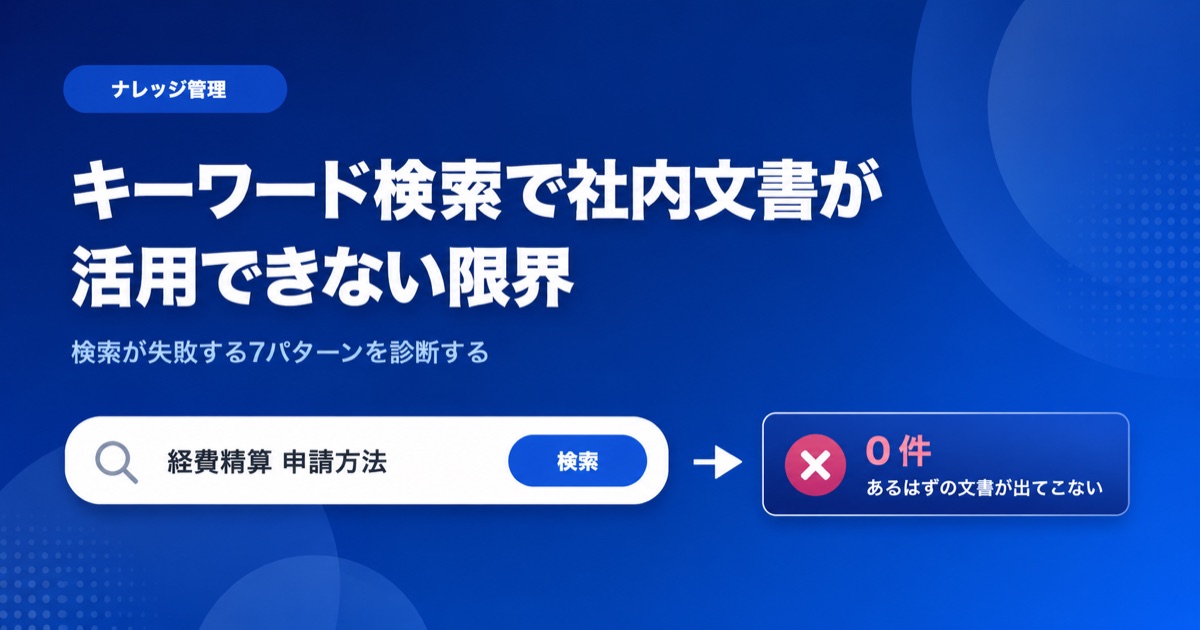
"No matter what I type into the search box, the file I want never shows up." You rolled out full-text search, yet people still end up asking the veteran on the team out loud. The documents are sitting right there in the shared drive, but search can't get you to them. This isn't because your search skills are lacking. It's because keyword search itself has structural limits built into how it works.
This article isn't a pitch for a solution. It's a diagnostic catalog of the specific ways search fails. We've sorted the reasons internal documents go underused into seven patterns. Figure out which one matches your situation, and you'll know what actually needs to change. We summarize the direction of the fix compactly in the second half and point you to related articles for the mechanics.
What you'll learn from this article
- The 7 failure patterns that keep keyword search from surfacing internal documents
- Why limits remain even after you deploy a full-text search AI tool
- How to tell the patterns apart by symptom -- PDFs, scans, inconsistent wording, and more
- The next move for breaking past the limits (internal document search with generative AI)
The 7 ways keyword search fails on internal documents
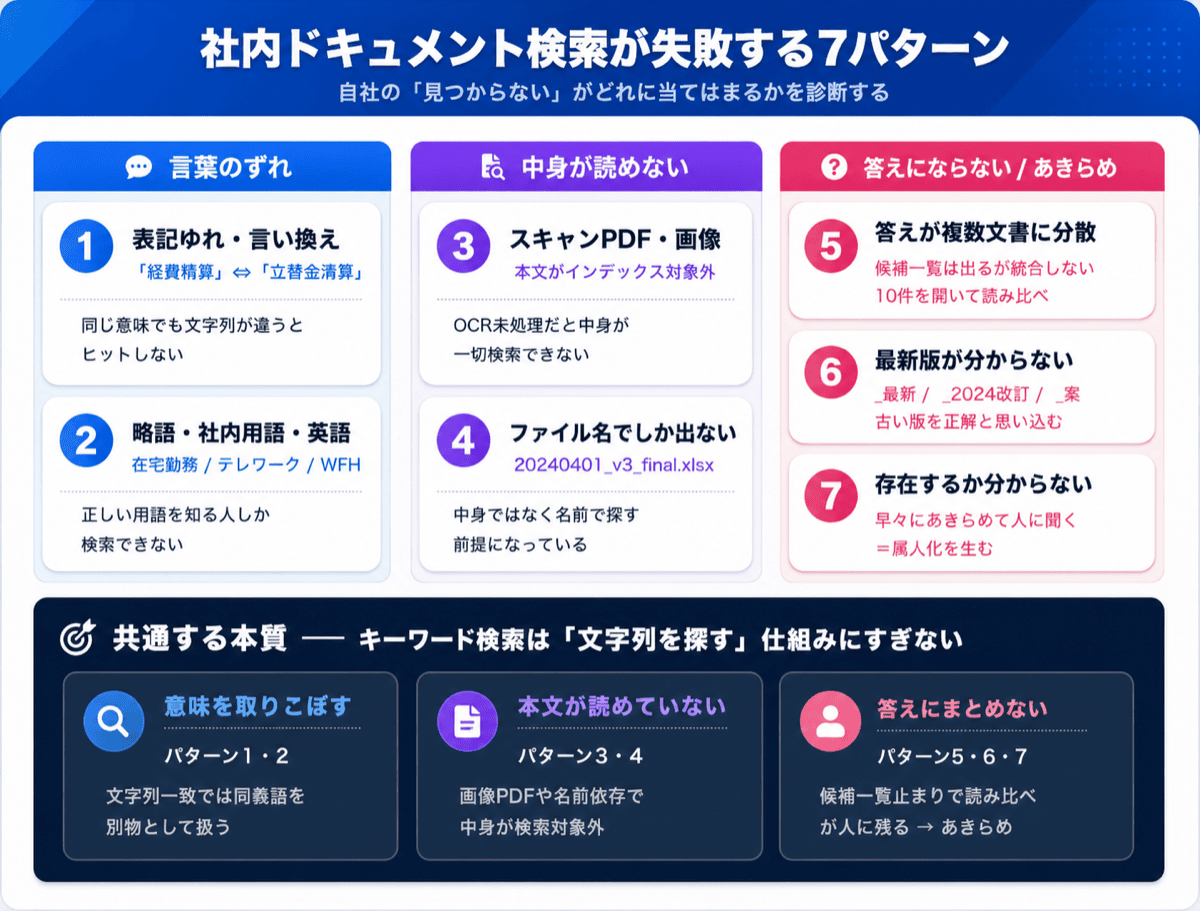
When searching internal documents doesn't work, the cause almost always falls into one of these seven patterns. As you read, think back to the times you "couldn't find it" and notice which one it was.
Pattern 1: Different wording, no hit (inconsistent terms and paraphrases)
You search for "expense reimbursement," but the document actually says "advance settlement" or "reimbursement procedure." They mean the same thing, yet a difference in the string alone produces no hit. Inside a company, departmental jargon and labels that changed from year to year all coexist. Words a human would instantly recognize as synonyms are treated by keyword search as entirely different things -- that's the first limit.
Pattern 2: Abbreviations, in-house terms, and English spelling mismatches
"Remote work," "working from home," "telework," "WFH." If there are four ways to express the same arrangement, the result changes depending on which one the searcher types. The same goes for variation between the official name and the abbreviation of a product code or internal project name. This creates a precondition where only people who already know the right term can search at all.
Pattern 3: The contents of PDFs and scanned documents aren't searchable
A PDF that's just a scan of paper, or a table or figure pasted in as an image. These may look like they contain text, but as data they are "images." Without OCR (character recognition) processing, the body text isn't in the full-text search index at all. This is one of the biggest reasons a file that "should be there" never appears in search.
Pattern 4: Only the file name is searchable
Many shared-drive searches effectively rely on matching the file name. Even when the answer is written in the body, if the file name is something soulless like "20240401_v3_final.xlsx," it won't match your search terms. Because the system assumes you'll find files by name rather than by content, search stops working the moment naming conventions break down.
Pattern 5: The answer is scattered across multiple documents
The answer to "How much can I claim for business-trip transportation?" is split across three places: the travel policy, the expense reimbursement manual, and an accounting department notice. Keyword search merely lists the files that look relevant; it won't pull the answer together across multiple documents. In the end, you open each of the ten hits one by one and read them side by side.
Pattern 6: You can't tell which version is current from the search results
When "Work Rules_Latest," "Work Rules_2024 Revision," and "Work Rules_Draft" all come up at once, the search results give you no way to tell which is the current version. The risk of mistaking an old version for the right answer is an everyday occurrence -- a problem that exists before search accuracy even enters the picture.
Pattern 7: You can't even tell whether the document exists
When a search turns up nothing, you can't distinguish "the document doesn't exist" from "it exists but isn't surfacing in search." This uncertainty drives a specific behavior: people give up on search early and go ask the person who knows. Search failure shows up not in how many times people search, but in how many times they stop searching.
Why limits remain even with a full-text search AI tool
"If keyword search is the problem, just deploy a full-text search engine or a search-focused AI tool." Plenty of teams have done exactly that and felt no real difference. Even after deploying a full-text search AI, some of the limits above stick around.
The reason is that most full-text search tools improve in the direction of "searching for strings faster and more broadly." Indexing and search speed get better, but the root of the search is still a mechanism that "looks for strings close to the words you entered" -- and that doesn't change.
- The inconsistent wording and paraphrasing of Patterns 1 and 2 won't be solved unless you build a thesaurus by hand. Maintaining an in-house term dictionary indefinitely is realistically expensive.
- The scanned PDFs of Pattern 3 can't be read by any search tool unless you separately run OCR to convert them to text.
- Consolidating multiple documents (Pattern 5) and judging which version is current (Pattern 6) are outside the scope of string-searching technology. These can't be solved without stepping from "searching" into "reading and answering."
In other words, full-text search AI helps with the "search fast and broad" problem, but the real limit of internal document utilization remains in the step where a person reads and judges among what was found.
A check to identify your own failure pattern
The right move changes depending on which pattern applies. Here's a quick guide to telling them apart.
| Common symptom | Likely pattern | Underlying cause |
|---|---|---|
| Changing the wording suddenly produces hits | Patterns 1 & 2 | Meaning lost to exact string matching |
| The file is visible but its contents won't surface | Pattern 3 | Body text isn't indexed (image PDFs, etc.) |
| You can't find it without knowing the file name | Pattern 4 | Reliance on naming conventions and tacit folder knowledge |
| You get many hits and have to read and compare | Patterns 5 & 6 | Search returns a "list of candidates," not an "answer" |
| People skip searching and ask someone | Pattern 7 | Giving up due to uncertainty; reliance on individuals |
If "changing the wording produces hits" is common for you, the issue is understanding meaning. If "having to read and compare" or "asking a person" is common, the issue is the step of pulling an answer together from what was found. Both lie in territory that string search can't reach by extending what it already does.
The next move beyond the limits -- from "searching" to "asking and getting an answer"
Many of these limits begin to dissolve when you switch the premise of search from "look for strings" to "understand meaning and return an answer." This is the approach commonly known as internal document search with generative AI. Monoshiri AI, an AI knowledge base for internal documents, takes exactly this approach, replacing "searching" with "asking and getting an answer."
Here are just the key points.
- Search by meaning: Even when the wording differs -- like "annual paid leave" versus "PTO" -- if the meaning is close, it can be treated as the same information (addresses Patterns 1 & 2).
- Return a consolidated answer: Integrate information scattered across multiple documents and reply with the key points, rather than a list of candidates (addresses Pattern 5).
- Usable just by asking: Even without knowing the right keyword or where the file is stored, you simply ask what you want to know in plain language (addresses Patterns 4 & 7).
We won't dig into the mechanics here. The mindset shift itself -- from keyword search to questions -- is covered in detail in From "Search" to "Ask" -- The New Standard for Accessing Internal Information in the AI Era, and the technology for searching by meaning along with rollout steps is covered in How to Search Internal Documents with AI.
For the actual features -- handling inconsistent wording, consolidating multiple documents, organizing by folder -- see the features page, and for how it's used across industries and departments, see the use cases page. They're good material for checking "could this fix the search failure we keep hitting?"
Conclusion
The reason keyword search can't surface internal documents isn't a lack of skill on the searcher's part -- it's a structural limit in how the mechanism works. In this article, we diagnosed that limit as seven failure patterns.
- Wording mismatches (Patterns 1 & 2): inconsistent terms, abbreviations, and paraphrases mean no hit even for the same meaning
- Contents can't be read (Patterns 3 & 4): scanned PDFs and file-name dependence keep the body text out of search
- It doesn't become an answer (Patterns 5 & 6): a candidate list appears, but consolidating documents and judging the current version don't happen
- Giving up (Pattern 7): uncertainty about existence breeds reliance on individuals as people stop searching and ask someone
- The limit of full-text search AI: "fast and broad searching" can be improved, but the "read and answer from what was found" step remains
Once you can pin down which pattern your "can't find it" belongs to, you'll see whether a thesaurus is enough, whether OCR is needed, or whether you need the mindset shift from "searching" to "asking and getting an answer." The state where internal documents are "present but unusable" can reliably move forward once you start with a diagnosis.
Share this article
Related Articles

How to Write Internal Documents an AI Can Actually Answer From -- We Tested It, and Spelled-Out Numbers Were the Culprit
How should you write internal manuals and policies so an AI answers correctly? We fed 12 documents with identical facts but different writing styles into a real AI and compared the answers. What determined accuracy was not good prose -- it was number notation and the first line of the document. Here are seven rules, ordered by impact.

Solving the 'Nobody Reads the Manual' Problem with AI
Discover the three reasons why internal manuals go unread and learn how an AI knowledge base can transform documentation from something employees read to something they ask.

From 'Search' to 'Ask' -- The New Standard for Internal Information Access in the AI Era
Internal information that traditional keyword search couldn't find is now instantly accessible by simply asking AI. This article explains semantic search and RAG in plain language, introducing a paradigm shift in how organizations access knowledge.