

"The document is supposed to be somewhere in the company, but search just won't surface it." You rolled out a full-text search tool, you built out an internal wiki, and yet people still end up asking the person who knows. The approach getting attention as a way out of this is generative AI document search.
This article lays out what it really means to search your internal documents with generative AI, from the practical angle of "what's different, and how do I get started?" In one read you'll get a handle on how it differs from traditional full-text search, keyword search, and internal wiki search; how the whole thing works; how to roll it out and what to look for when choosing a tool; and how Monoshiri AI delivers it. We point you to related articles for the finer mechanics, so start by grasping the big picture here.
What you'll learn in this article
- What generative AI document search is (and how it differs from traditional internal search)
- The limits of full-text search, keyword search, and internal wiki search
- How generative AI internal search works at a high level (just the essentials of vector search and RAG)
- How to roll it out without failing, plus 5 points for choosing a tool
- How to search internal documents with Monoshiri AI
What generative AI document search is
Generative AI document search is a system where AI understands the contents of the documents your company has accumulated, and when you ask in plain language, it gives you the answer.
Traditional internal search returns "a list of files that match the words you typed." Generative AI internal search, by contrast, understands the meaning of your question, gathers the relevant passages from across multiple documents, and returns an answer that pulls the key points together. The work of opening a list of search results and comparing them disappears, and the experience shifts from "searching" to "asking and getting an answer."
There are three things that make it work:
- Search by meaning: Even when the words differ -- "annual paid leave" versus "PTO" -- if the meaning is close, it can treat them as the same information
- Answers, pulled together: It consolidates information scattered across multiple documents and answers with the key points, not just a list of candidates
- You just ask: You don't need to know the right keyword or where the file is saved; you simply ask what you want to know in natural language
For more on this shift in thinking -- from search to question -- see From "Search" to "Ask" -- The New Standard for Internal Information Access in the AI Era.
How it differs from traditional internal search -- full-text search, keyword search, internal wikis
You might think, "Surely the tools we already have can do internal search?" But the traditional approaches share a common limit. Here's how they differ from generative AI internal search.
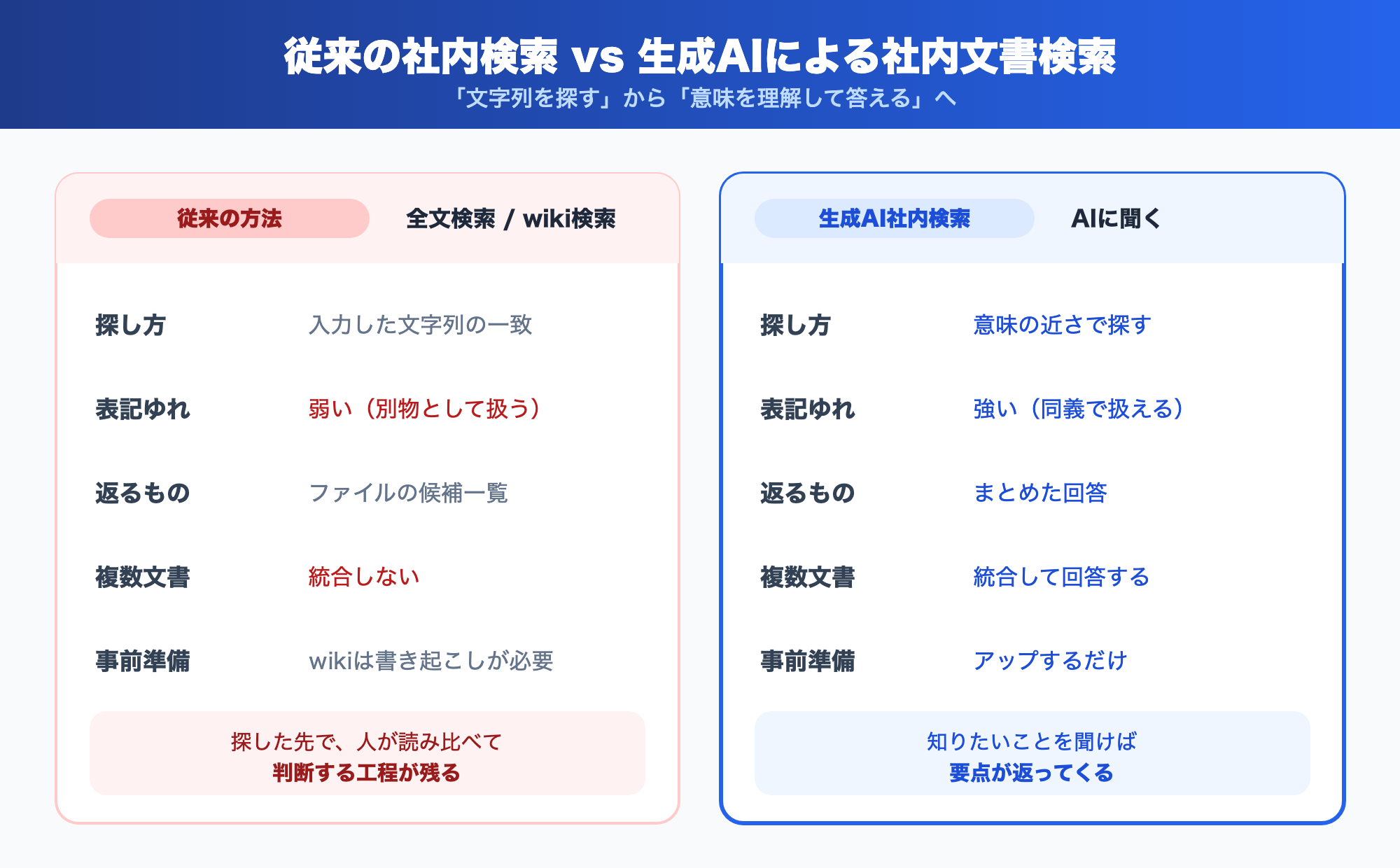
The limits of keyword and full-text search
Shared-folder search, file-server search, and most of the tools marketed as "full-text search AI" work by finding words close to the string you typed -- faster and across more content. Speed and index accuracy may improve, but the root of the search is still "finding a string," and that doesn't change.
As a result, the following gaps remain:
- Searching for "expense reimbursement" won't hit a document that says "advance settlement" (variations and rephrasing)
- A scanned PDF is treated as an image, so its body text isn't part of what gets searched
- All you get is a list of candidates; it won't pull an answer together across multiple documents
For the concrete ways keyword search fails on internal documents, Why Keyword Search Fails on Internal Documents -- 7 Search Failure Patterns Diagnosed sorts them into seven patterns and diagnoses each. If you want to pin down "which failure is ours," read it alongside this one.
The limits of internal wiki search
Search inside internal wikis and documentation tools is, at its core, also keyword matching. On top of that, a wiki assumes that someone writes, organizes, and keeps it up to date. The burden on the author is heavy, and once updates stall, the information goes stale -- and search can no longer tell you whether what you found is the current version.
Generative AI internal search reads your existing documents (PDF, Word, Excel, text, and so on) as they are, which is the big difference: it doesn't assume you'll rewrite everything for a wiki.
Comparison table
| Aspect | Keyword / full-text search | Internal wiki search | Generative AI document search |
|---|---|---|---|
| How it searches | String match | String match | Closeness in meaning |
| Variations / rephrasing | Weak | Weak | Strong |
| What you get back | List of candidate files | List of candidate pages | A consolidated answer |
| Consolidating multiple docs | No | No | Yes |
| Prep required | Indexing only | Rewriting articles | Just upload documents |
How generative AI internal search works at a high level
Generative AI document search works, roughly, in the following flow. We leave the technical details to the linked articles; here, just grasp the big picture.
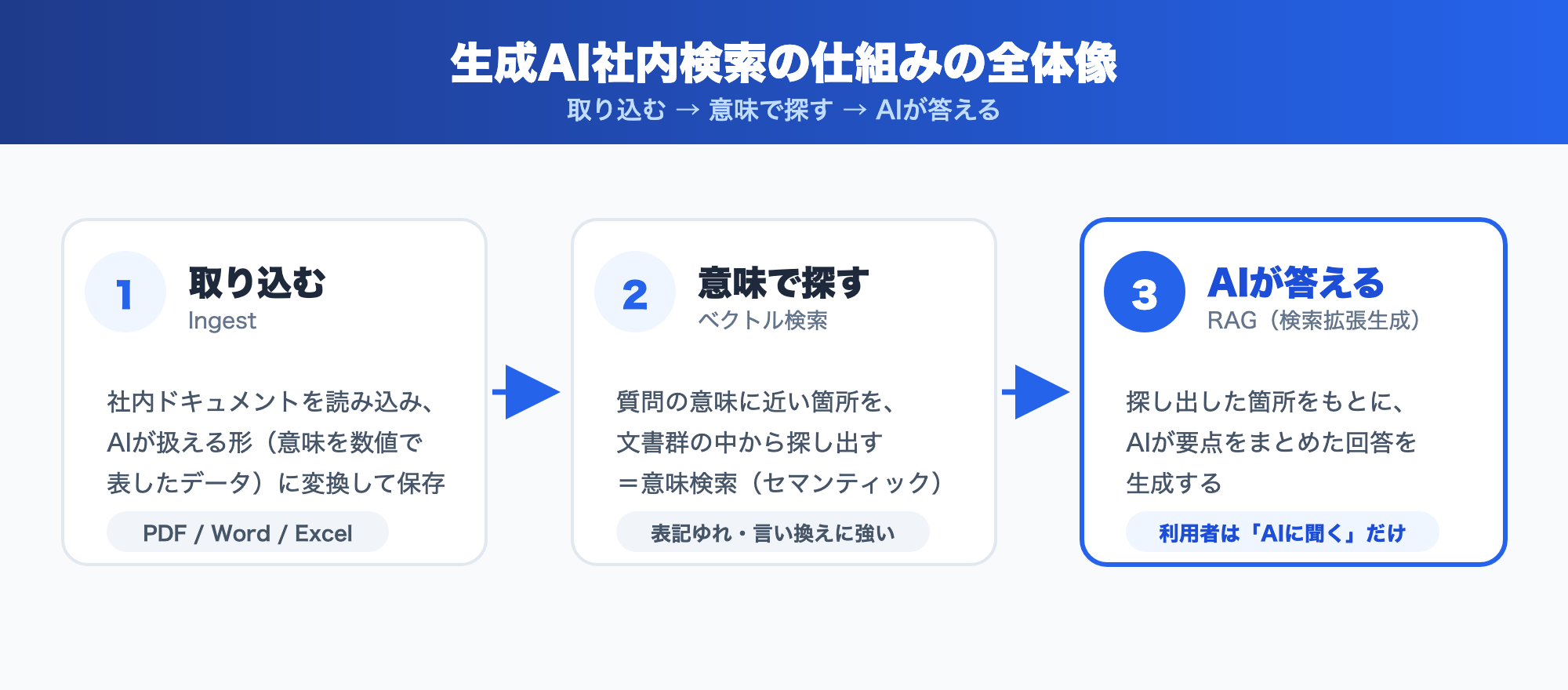
- Ingest: It reads your internal documents and converts them into a form AI can work with (data that represents meaning as numbers), then stores it.
- Search by meaning: When a question comes in, it finds the passages closest in meaning from across your document set. This is vector search (semantic search).
- AI answers: Based on the passages it found, the AI generates an answer that pulls the key points together. This whole "search, then answer" mechanism is RAG (retrieval-augmented generation).
If you want a deeper understanding of each piece, we have related articles.
- The technology for searching by meaning, plus rollout steps: How to Search Internal Documents with AI -- Keyword Search vs. Semantic Search and How to Get Started
- How "search, then answer" RAG works: What Is RAG? A Plain-English Guide to the Technology Reshaping Internal Document Search
That said, RAG and vector search are means, not ends. From the user's point of view, the experience is everything: "ask AI about the company and it answers." Being usable without thinking about the technology's name is what makes generative AI internal search valuable.
How to roll it out without failing
Rolling out generative AI internal search succeeds not by going company-wide all at once, but by starting small and expanding. Proceed in these four steps.
Step 1: Pick one workflow that has a problem
Start by narrowing to a single situation where "search is a pain." Inquiry handling, back-office policy lookups, fielding questions from new hires -- workflows where the same questions come up repeatedly are a good fit.
Step 2: Gather the relevant documents
Collect the documents that workflow refers to. Most generative AI internal search can read your existing PDF, Word, and Excel files as they are, so no rewriting is needed. Organizing them into folders by department or topic makes permission management easier later.
Step 3: Test it and check answer quality
Throw the questions people actually ask at it, and check whether the answers are correct and whether the supporting documents are cited appropriately. The trick is to ask in the words people on the ground actually use.
Step 4: Expand usage
Once you feel good about the quality, expand to other workflows and teams. If that first workflow has people convinced it "works," scaling out goes smoothly.
For what to prepare early on to get off the ground quickly, 5 Things to Do in the First 30 Days After Adopting an AI Knowledge Base is also worth a read.
5 points for choosing a tool
There are more and more tools that deliver internal document search with generative AI. We've narrowed the things worth checking when you choose down to five.
- Ease of adoption: Can you start using it just by uploading documents, with no specialist knowledge?
- Supported formats: Can it read the formats you use in-house -- PDF, Word, Excel -- as they are?
- Permission management: Can you split what's visible by department or folder? You want to avoid everyone being able to see every document.
- Security: Is the data stored in-region, separated per organization, and encrypted?
- Points of entry: Can people ask not only from an admin screen but from the tools they use day to day (chat on your website, LINE, and so on)?
For how to approach a feature-by-feature comparison, Internal Wiki & Knowledge Management Tools Compared (2026): How to Choose for AI Search also lays it out.
Searching internal documents with Monoshiri AI
Monoshiri AI delivers generative AI document search in a way that meets every point above.
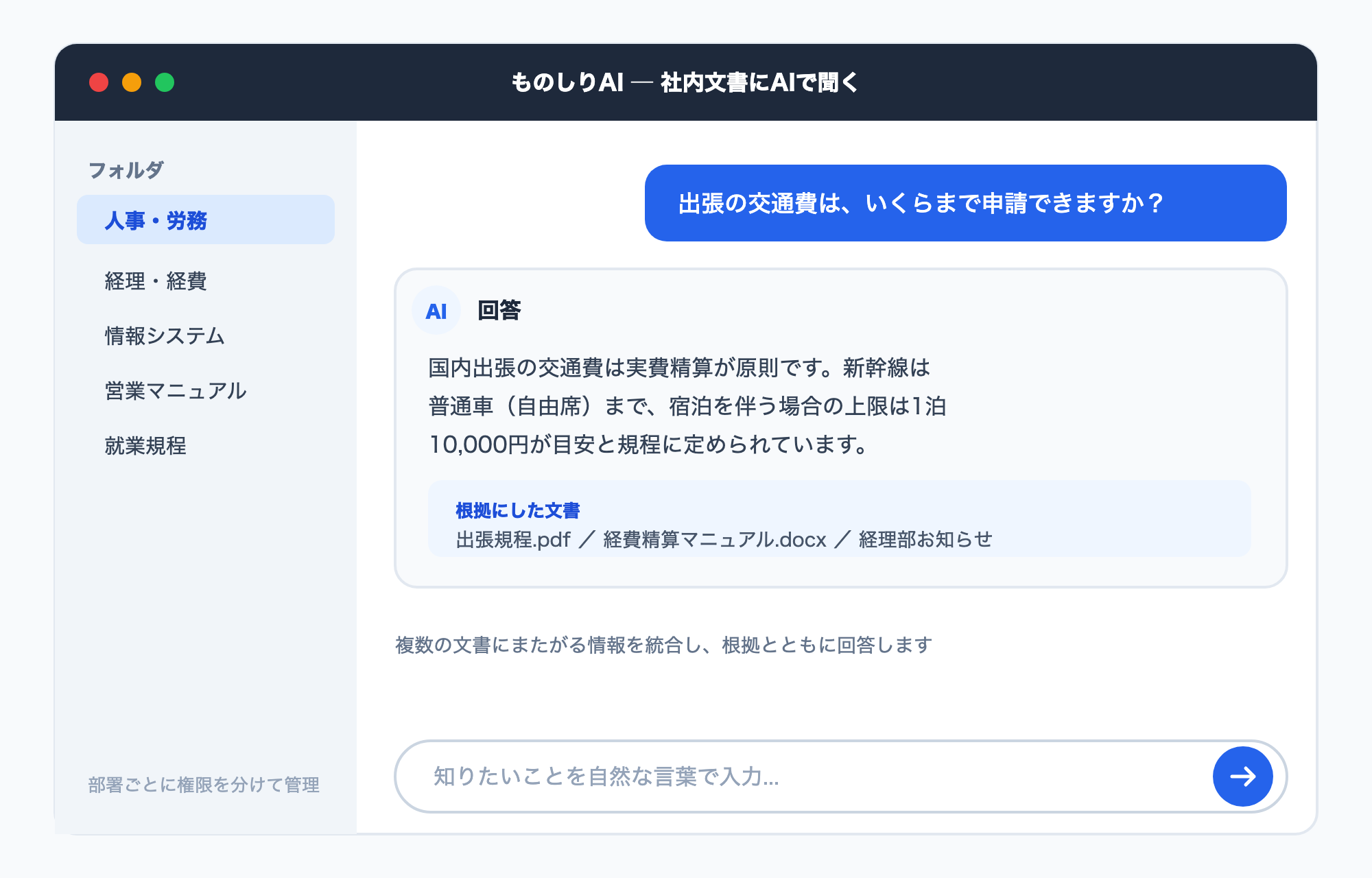
- Just upload documents: Feed it your PDF, Word, Excel, and more, and it's instantly ready to take questions. No rewriting for a wiki.
- Searches by meaning and answers: Strong against variations and rephrasing, it consolidates information spanning multiple documents into one answer (Features).
- Organize and manage permissions by folder: Split folders by department or project and control what's visible to whom.
- Multiple points of entry: Ask your internal documents right within your usual flow -- via the chat widget you can embed on your website, or the LINE integration.
- Security: Supports in-region operation, per-organization data separation, and encryption (Security).
- Unlimited users: Start on the free plan; paid plans begin at 2,980 yen per month. Roll it out company-wide without worrying about headcount (Pricing).
How it's used by industry and department is collected in Use Cases, and common questions in the FAQ.
Summary
Generative AI document search turns traditional internal search, which "finds a string," into search that "understands meaning and answers." Here are the key points.
- What's different: Keyword search, full-text search, and internal wiki search assume string matching, and they're weak on variations and on consolidating multiple documents. Generative AI internal search searches by meaning and returns a consolidated answer
- How it works: Three steps -- "ingest, search by meaning (vector search), AI answers (RAG)." Users just "ask AI," without thinking about the technology
- How to roll it out: Start small with one problem workflow, confirm the quality, then scale out
- What to look for: Ease of adoption, supported formats, permission management, security, and points of entry -- five things
- With Monoshiri AI: Start just by uploading documents, with folder-level permission management, multiple points of entry, and in-region security
Documents that are "right there but unusable" can be moved forward by changing how search works. Start with one workflow that has a problem, and give generative AI internal document search a try.
Share this article
Related Articles

Japan's AI Guidelines: Writing an Internal AI Usage Policy (2026)
Japan's AI Promotion Act and the AI Guidelines for Business v1.2: what they actually ask of a small or mid-sized company, and 10 items for your internal AI policy.

How to Add a Chatbot to STUDIO -- The Custom Code Method, Step by Step (2026)
How to install an AI chatbot on a site built with STUDIO, following the actual settings screen. Covers why a paid plan is required, why nothing shows up in preview, and why the Embed box is the wrong place for it.

How to Add a Chatbot to Wix -- The Custom Code Method, Step by Step (2026)
How to install an AI chatbot on a Wix site, following the actual dashboard screen. Covers why a connected domain is a prerequisite, the spec where changing domains deletes your snippet, and how it differs from the built-in chat.



![Automate Website Inquiries with AI -- A Chat Widget Implementation Guide [2026 Edition]](/blog/chat-widget-guide/header.jpg)